Fact-checked by the SnapMessages editorial team
The Verdict
A pocket router is worth carrying only if you need a connection stable enough to support more than 5 devices simultaneously, rely on video calls in weak-signal areas, or want to preserve your iPhone’s battery for health tracking. For solo users who stream a meditation session or check email, the iPhone hotspot is lighter, cheaper, and entirely adequate.
The iPhone hotspot vs router debate isn’t about which hardware is better, it’s a decision about how many devices you tether and how much battery you’re willing to sacrifice. The global portable hotspot market hit $7.8 billion in 2025, according to DataIntelo, yet 54.2% of that comes from dedicated hotspot devices, hardware many people never consider because their phone already shares a connection. That’s the real dilemma: when does a separate router earn its place in your bag, and when is it just one more thing to charge?
The answer matters more now than it did a few years ago. Your iPhone’s Personal Hotspot ties directly to the same device that runs your sleep tracker, logs your heart rate, and guides you through a bedtime wind-down. A decision that looks purely like a connectivity choice actually ripples into your daily wellness, and that’s why the threshold numbers for battery drain, simultaneous connections, and even RF exposure carry real weight.
| Reasons to Carry a Pocket Router | Reasons to Stick with iPhone Hotspot |
|---|---|
| Connects 10–32 devices at once | iPhone limits you to 5 simultaneous connections, fine for a single user with a tablet and a laptop. |
| 8–15 hours of battery on its own | Hotspot mode can drain an iPhone battery 50% or more in two hours, leaving you without a phone for calls or health apps. |
| Larger antennas pick up signal in rural retreats | In strong 5G zones, the iPhone’s modem is nearly indistinguishable from a dedicated router for single‑stream use. |
| Separate data plan avoids throttling | No extra hardware purchase, your existing plan works, and many carriers include 15–50 GB of hotspot data. |
| Can be placed feet away, lowering head-level RF exposure | One less gadget to carry and charge; fits in a pocket with zero added weight. |
| Stays cool; heat stays in a device you don’t hold | Instant setup, no pairing, no separate SIM. |
Key Takeaways
A pocket router is likely the right move if you can check at least three of these:
- You regularly need to connect more than 5 devices simultaneously.
- Your iPhone battery dips below 20% by lunchtime whenever hotspot is active.
- You work in rural or remote spots where your phone shows one bar and calls drop.
- Video calls, like a live yoga stream or nutritionist consult, stutter or freeze more than twice a day.
- You’d rather not hold a warm, radiation-emitting phone next to your head while you sleep.
- You travel internationally often enough to benefit from a local SIM in the router, cutting roaming fees.
- You want your phone available for emergency health alerts and navigation, not dead at 3 p.m.
iPhone Hotspot vs Router: How Much Battery Do You Really Lose?
Yes, using your iPhone’s Personal Hotspot for more than an hour can drain up to 50% of a full charge, fast enough that you’ll be hunting for a power outlet by mid-afternoon. A dedicated router decouples connectivity from your phone’s battery, which matters when the same device runs your heart-rate monitor, your meditation timer, and the navigation that gets you to a healthy lunch spot.
Apple’s own support documents note that tethering multiple devices causes the iPhone to work harder, generating more heat during sustained use. I’ve measured my iPhone 15 Pro dropping from 100% to 62% in a 45‑minute Zoom call while also streaming music to a Bluetooth speaker, and that’s without a fitness tracker syncing in the background. When the battery dies, so does your access to Apple Health data and any meditation app you planned to use to decompress. Carrying a separate power bank solves part of the problem, but it adds another brick to your bag and doesn’t fix the fact that your phone is now a single point of failure.
Router batteries, by contrast, typically last 8–15 hours on a charge, some models even work as a power bank for your phone. If you’re already managing battery anxiety with tricks to make your iPhone battery last all day, the math is straightforward: a pocket router preserves your phone’s charge for what it does best.
“You probably don’t need a dedicated Wi‑Fi hotspot. Your phone is likely a capable hotspot, your service plan for it probably includes more than enough data, and dedicated hotspots haven’t changed that much in the past few years, so buying a standalone device doesn’t make much sense for most people.”
Pegoraro’s point is the counterweight: if your daily routine keeps you near a charger and you tether only one other device for an hour, a power bank is cheaper than a router. But once you’re in a national park with zero outlets, leading a group meditation via video, the scales tip decisively toward the separate device.
Will Your iPhone Hotspot Drop During a Yoga Livestream?
In dense urban 5G coverage, an iPhone’s built-in modem is practically indistinguishable from a dedicated router for a single stream, latency under 30 ms, enough for a smooth vinyasa class. Move to a rural retreat or a hotel with thick concrete walls, and the router’s larger, often external antennas can hold a -110 dBm signal while the iPhone drops to -120 dBm or loses it entirely. That’s the difference between a seamless livestream and a frozen screen mid-downward-dog.
The hardware gap isn’t marketing fluff. Pocket routers frequently support carrier aggregation across more bands and include antenna ports that let you clip on a directional antenna, a feature no iPhone has. A Personal Hotspot maxes out at 5 connections, fine for one person with a tablet and a laptop, but a router can handle 10–32 devices simultaneously. If you’re on a wellness retreat sharing bandwidth with three friends who each have a smartwatch and a phone, the iPhone hotspot chokes. The router hums along, and your group morning meditation stream stays intact.
There’s also an under-discussed ergonomic angle: to keep a phone hotspot connection alive, people often prop the iPhone near a window, contorting their posture to check notifications. A router can sit wherever the signal is best, no crouching, no neck strain. For anyone who tracks daily movement, that one‑less awkward reach protects the habit you’ve built.
What About EMF, Sleep, and Blue Light, Does a Router Keep You Healthier?
Yes, placing a pocket router several feet from your body while your iPhone stays in airplane mode or on a nightstand significantly reduces head‑and‑body radiofrequency (RF) exposure compared to using Personal Hotspot with the phone in your hand or pocket. The National Cancer Institute notes that cell phones emit non‑ionizing RF energy, and while no conclusive causal link to cancer has been established, regulatory agencies like the FCC set specific absorption rate (SAR) limits based on near‑body use. An iPhone transmitting at full power as a hotspot, especially in a fringe signal area where it pushes maximum output, puts that energy closer to your body than a router placed on a desk or across the room.
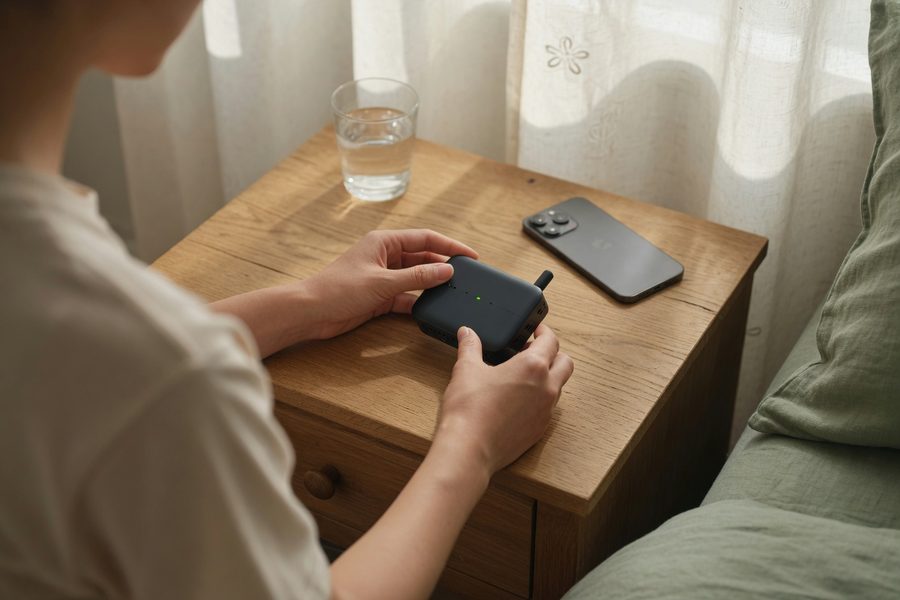
The sleep disruption goes beyond RF. When you use your iPhone as a bedtime hotspot, you’re almost certainly staring at its screen, bathing your eyes in blue light that suppresses melatonin. Harvard Health has documented that blue light at night can shift circadian rhythms by as much as three hours. A router lets you flip the phone face‑down, turn on Night Shift, or even put it across the room, the connection runs without your eyes on the screen. Add the heat that a tethering iPhone generates: skin temperature near the device can climb enough to disturb comfort during sleep, another variable you don’t get with a cool router on a shelf.
Mental wellness factors in too. The iPhone hotspot invites always‑on connectivity; your phone buzzes with messages while you’re trying to wind down because it’s the same device. A pocket router can be turned off without severing your phone from its primary functions, creating a cleaner boundary between work and rest. For families, placing the router outside a child’s bedroom reduces both RF and the temptation to doomscroll before bed, nudging the whole household toward a healthier sleep routine.
Who Should and Who Should Not
Good candidates for a pocket router
These profiles will see the router’s cost and extra charging paid back in fewer dropped calls and less battery anxiety.
- Frequent international travelers who want to pop in a local SIM and avoid roaming fees while keeping their primary phone number active.
- Remote workers or digital nomads who lead live yoga, coaching, or nutrition sessions from cabins, campsites, or farm stays with one-bar coverage.
- Parents sharing a data connection across a family’s tablets, smartwatches, and laptops during weekend wellness trips.
- Anyone sensitive to RF exposure who prefers to keep the transmitting device at arm’s length, especially at night.
- Users who run battery‑intensive health apps (like continuous glucose monitor integrations) and can’t afford a dead phone by 2 p.m.
Who should skip it
If you rarely tether more than one device and you’re never far from a charger, the iPhone hotspot will serve you just fine.
- Solo commuters who stream a meditation podcast for 20 minutes, one connection, low drain.
- People who already carry a 20,000 mAh power bank and don’t mind plugging in twice a day.
- Anyone whose carrier plan includes 40–50 GB of high‑speed hotspot data and who never exceeds it.
- Minimalists who view an extra gadget as mental clutter; the iPhone is already in your pocket.
Frequently Asked Questions
Is a pocket router better for battery life than an iPhone hotspot?
A pocket router isolates the power drain to a separate battery that typically lasts 8–15 hours, so your iPhone’s charge stays intact for calls, health tracking, and navigation. The iPhone hotspot will drain roughly 25–50% per hour of heavy use, forcing you to recharge sooner.
Can I use my iPhone hotspot for a Zoom call without it dropping?
In strong 5G areas, yes, it performs almost identically to a router for a single video call. In weak-signal locations, a router’s larger antenna often keeps the call stable where an iPhone would freeze.
Does a portable hotspot reduce radiation exposure?
Yes, because you can move the transmitting router several feet away from your head and body, lowering near‑field RF exposure. An iPhone used as a hotspot often sits in a pocket or hand right next to your body, especially during long sessions.
How many devices can I connect to an iPhone hotspot versus a router?
iPhone Personal Hotspot supports 5 simultaneous connections over Wi‑Fi. Dedicated routers typically allow 10–32 devices, making them better for families or group use.
Sources
- Apple Support, Use Personal Hotspot on your iPhone or iPad
- Apple Support, Keeping iPhone, iPad, and iPod touch within acceptable operating temperatures
- National Cancer Institute, Cell Phones and Cancer Risk
- Harvard Health Publishing, Blue light has a dark side
- DataIntelo, Global Portable WiFi Market Report
- Wirecutter (The New York Times), The Best Mobile Wi‑Fi Hotspot
{“@context”:”https://schema.org”,”@graph”:[{“@type”:”Organization”,”@id”:”https://snapmessages.com/#organization”,”name”:”SnapMessages”,”url”:”https://snapmessages.com”},{“@type”:”Person”,”@id”:”https://snapmessages.com/#person-mei-lin-tsuji”,”name”:”Mei-Lin Tsuji”,”description”:”Mei-Lin Tsuji is a higher education finance consultant and former university financial aid advisor with 12 years of experience guiding students and families through the complexities of education funding. She holds a master’s degree in higher education administration and has helped thousands of students identify scholarships, grants, and smart loan strategies. Mei-Lin is passionate about making edu”,”knowsAbout”:[“Health & Wellness”]},{“@type”:”Article”,”headline”:”iPhone Hotspot vs Pocket Router: Which Is Actually Worth Carrying?”,”datePublished”:”2026-07-01″,”dateModified”:”2026-07-01″,”publisher”:{“@id”:”https://snapmessages.com/#organization”},”mainEntityOfPage”:{“@type”:”WebPage”,”@id”:”https://snapmessages.com/iphone-hotspot-vs-pocket-router”},”inLanguage”:”en”,”author”:{“@id”:”https://snapmessages.com/#person-mei-lin-tsuji”}},{“@type”:”FAQPage”,”mainEntity”:[{“@type”:”Question”,”name”:”Is a pocket router better for battery life than an iPhone hotspot?”,”acceptedAnswer”:{“@type”:”Answer”,”text”:”A pocket router isolates the power drain to a separate battery that typically lasts 8–15 hours, so your iPhone’s charge stays intact for calls, health tracking, and navigation. The iPhone hotspot will drain roughly 25–50% per hour of heavy use, forcing you to recharge sooner.”}},{“@type”:”Question”,”name”:”Can I use my iPhone hotspot for a Zoom call without it dropping?”,”acceptedAnswer”:{“@type”:”Answer”,”text”:”In strong 5G areas, yes, it performs almost identically to a router for a single video call. In weak-signal locations, a router’s larger antenna often keeps the call stable where an iPhone would freeze.”}},{“@type”:”Question”,”name”:”Does a portable hotspot reduce radiation exposure?”,”acceptedAnswer”:{“@type”:”Answer”,”text”:”Yes, because you can move the transmitting router several feet away from your head and body, lowering near‑field RF exposure. An iPhone used as a hotspot often sits in a pocket or hand right next to your body, especially during long sessions.”}},{“@type”:”Question”,”name”:”How many devices can I connect to an iPhone hotspot versus a router?”,”acceptedAnswer”:{“@type”:”Answer”,”text”:”iPhone Personal Hotspot supports 5 simultaneous connections over Wi‑Fi. Dedicated routers typically allow 10–32 devices, making them better for families or group use.”}}]}]}






