
Fact-checked by the SnapMessages editorial team
Quick Answer
An app permission audit is a deliberate review of every data access right your installed apps hold, followed by revoking anything unnecessary. Most users have never done one, yet 73% of businesses report that unsolicited app permission requests bother them, and popular fitness apps collect an average of 12 different data types per app. The process takes roughly 30 minutes and can be done directly in your phone’s privacy settings.
An app permission audit means opening your device’s privacy settings, examining what each installed app can access, and revoking permissions that serve no clear purpose. This is not a technical exercise reserved for IT professionals. It is a practical privacy habit, and given that a study of nearly 16,000 free mobile health apps found that 88% had the technical ability to share personal data with third parties such as Google and Facebook, the urgency is real and measurable.
What makes this especially relevant for health and wellness users is the data those apps collect: sleep patterns, menstrual cycles, mood logs, mental health assessments, and precise location near medical facilities. This guide walks through why wellness apps carry higher risk than most, how to run a platform-specific audit on iOS and Android, what to do about data that already left your device, and how to make this a quarterly habit rather than a one-time panic response.
Key Takeaways
- 73% of survey respondents across 330 businesses worldwide reported that unsolicited mobile app permission requests bother them, according to GoodFirms’ 2025 permissions research.
- Popular fitness apps collect an average of 12 different data types, including sensitive health information and precise location, per Surfshark’s 2025 analysis of 16 top fitness apps.
- The Fitbit app alone collects 24 unique data types, double the average among fitness apps analyzed, based on Surfshark’s App Store privacy label review.
- The FTC penalized BetterHelp $7.8 million in 2023 for sharing sensitive mental health data with advertisers including Facebook and Snapchat without adequate user consent, establishing a concrete enforcement precedent for wellness app data misuse.
- 41% of 1,000 US survey respondents say they are very or extremely concerned about online privacy, per Surfshark’s April 2025 US privacy paradox study, yet most have never reviewed which apps can access their microphone or location.
In This Guide
- Why Your Wellness Apps Know More About You Than Your Doctor Does
- What an App Permission Audit Actually Is
- The Pre-Audit Inventory: Know What Is Actually on Your Phone
- How to Run the Audit on iOS and Android
- What Happens After You Grant a Permission
- Revoking, Deleting, and Requesting Data Erasure
- Building a Quarterly Privacy Habit That Actually Sticks
- Frequently Asked Questions
Why Your Wellness Apps Know More About You Than Your Doctor Does
Fitness, nutrition, mental health, and period-tracking apps collect data your physician would need years of appointments to accumulate: daily mood scores, exact sleep duration, menstrual cycle irregularities, caloric intake, heart rate variability, and GPS coordinates near specific medical facilities. That data profile is intimate, detailed, and legally far less protected than most users realize.
The HIPAA Illusion
The most consequential misconception in consumer health privacy is that wellness apps are covered by HIPAA. They are not. HIPAA applies exclusively to covered entities: hospitals, clinicians, health insurers, and their direct contractors. Apps like Calm, Headspace, a calorie counter, or a period tracker fall entirely outside that framework. They can legally sell, license, or share your health data with advertisers, data brokers, or analytics platforms, and many do.
The proposed Health Information Privacy Reform Act (HIPARA), introduced in November 2024, would extend HIPAA-like protections to the approximately 320 million global health app users currently in this regulatory gray zone. As of October 2025, it has not been enacted. Until it is, the legal protections most health-conscious users assume they have simply do not exist for consumer wellness apps. That gap is why a personal app permission audit is the only enforcement layer actually under your control.
Research found that about a quarter of free mobile health apps violated their own stated privacy policies, meaning even reading the fine print is not a reliable safeguard. App-level permission controls remain the only layer users can directly enforce on their own device.
The Employer Wellness Program Gray Zone
There is a second, largely unreported risk: wearables distributed through corporate wellness programs. Whether HIPAA applies depends on whether the program is tied to a group health plan. Many are not. The Equal Employment Opportunity Commission’s December 2024 guidance warned that collecting health data via employer-provided wearables could constitute a prohibited medical examination under the Americans with Disabilities Act, raising direct discrimination concerns. If your employer issued a fitness tracker as part of a wellness incentive, the permissions that device holds may expose data you never intended to share with your workplace.
What an App Permission Audit Actually Is
An app permission audit is a deliberate, structured review of every data access right an installed app holds on your device, followed by explicit revocation of anything that is not strictly necessary. It is the opposite of the passive “tap Allow” behavior most people default to during app onboarding. The audit does not require coding knowledge or third-party tools. It requires about 30 minutes and access to your phone’s built-in privacy settings.
CISA advises users to first audit all installed apps and remove unused ones, then review remaining apps’ data-access categories and deny any permissions that are not necessary for the app’s function. That two-step sequence, inventory then review, is the correct order. Jumping straight to revoking permissions on a cluttered phone misses the apps you forgot were even installed.
Reframing the Habit
Most people have never done an app permission audit because it sounds technical. It is not. Think of it as the privacy equivalent of clearing out your pantry: you check what is there, remove what has expired or serves no purpose, and keep only what you actively use. For a health-and-wellness reader already tracking sleep, steps, and nutrition, adding a quarterly permission review to that routine is a natural extension of the same self-care logic.
If you are already working on a broader personal security routine, the permission audit slots naturally into a larger framework. Our guide on building a personal digital security routine covers how to sequence these habits so none of them feels overwhelming in isolation.
The Pre-Audit Inventory: Know What Is Actually on Your Phone
Before touching a single permission toggle, take stock of what is installed. Dormant apps, ones you downloaded once and never opened again, frequently hold live permissions and may run background data collection without any active use from you. Health and fitness apps are especially prone to this: a period tracker downloaded two years ago still has microphone access if you never revoked it.
Reading Privacy Nutrition Labels Before You Install
Both major platforms now offer privacy disclosures at the app store level. Apple’s App Store shows a “Privacy Nutrition Label” under the app listing. Google Play’s Data Safety section, introduced in 2022, requires developers to declare what data they collect and whether it is shared with third parties.
These labels are imperfect. Developers self-report, and enforcement has been inconsistent. Still, a red flag appears quickly when an app’s stated function does not match what it claims to collect. A simple flashlight app declaring that it collects precise location and contacts is a signal worth acting on before installation. The FTC’s guidance for app developers explicitly instructs them not to collect data they don’t need, for example a photo-editing app should never request contact information, because data that is never collected does not need to be secured. When an app ignores that principle, the burden of protection falls on you.
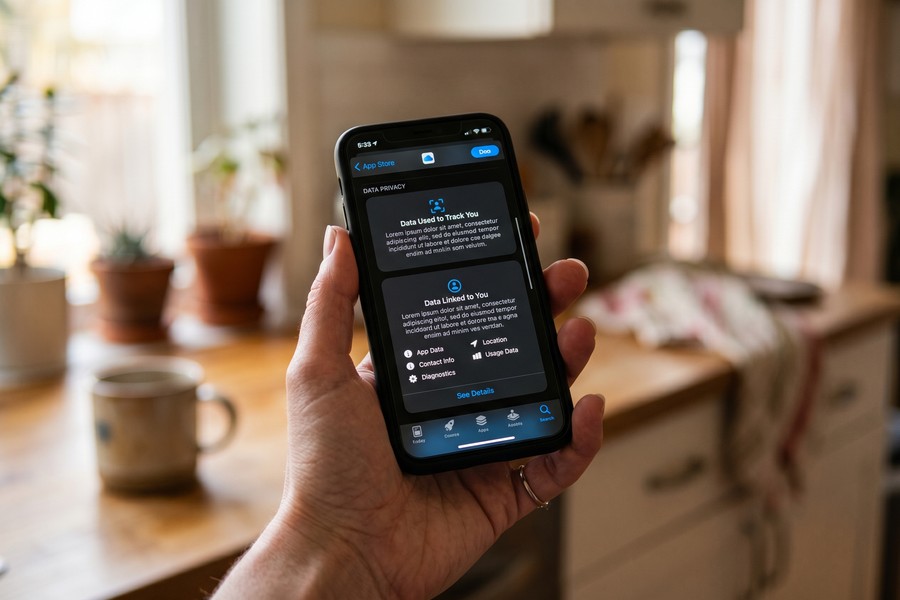
The Fitbit app collects 24 unique data types according to its App Store privacy label, double the average of 12 data types collected by the 16 popular fitness apps analyzed in Surfshark’s 2025 research. That includes sensitive health information and precise location data.
How to Run the Audit on iOS and Android
The mechanics differ slightly by platform, but the goal is identical: review each sensitive permission category and revoke access for any app that cannot justify needing it for its core function.
iOS Walkthrough
On iPhone, go to Settings > Privacy & Security. Each category, Location Services, Contacts, Microphone, Camera, Health, and so on, lists every app that has requested that permission. Tap any category to see which apps have access and at what level. For location, you have four granular options: Never, Ask Next Time, While Using the App, and Always. For wellness users, “Always” location access deserves particular scrutiny: a meditation app has no legitimate reason to track your location continuously.
Work through these five high-risk categories in this order: Location Services, Microphone, Camera, Contacts, and Health. These carry the greatest exposure for health and wellness data. For anything you cannot immediately explain, revoke and observe whether the app still functions normally. Most of the time, it will.
Android Walkthrough
On Android (10 and later), navigate to Settings > Privacy > Permission Manager. The layout mirrors iOS: tap a permission type to see every app holding it. Android’s granular location controls allow you to restrict apps to “Only while using” or deny entirely. Android also surfaces a Privacy Dashboard (Android 12 and later) showing a 24-hour timeline of which apps accessed the microphone, camera, and location, and exactly when. That dashboard frequently reveals access patterns users would not otherwise notice.
For Android users who want to go further, the hidden Android developer options include additional diagnostic tools for monitoring background app behavior and restricting background activity per app.
Apply the Start with No principle across both platforms: deny permissions by default when installing a new app, then grant selectively only when you encounter a specific feature that genuinely requires it. This reveals which apps request far more access than their core function requires. An app that immediately stops working when you deny microphone access may have a legitimate need. An app that functions identically with or without it does not.
| Permission Type | iOS Setting Path | Android Setting Path | Risk Level for Wellness Users |
|---|---|---|---|
| Location | Settings > Privacy & Security > Location Services | Settings > Privacy > Permission Manager > Location | High, reveals medical facility visits |
| Microphone | Settings > Privacy & Security > Microphone | Settings > Privacy > Permission Manager > Microphone | High, passive audio capture risk |
| Camera | Settings > Privacy & Security > Camera | Settings > Privacy > Permission Manager > Camera | High, undisclosed in 16 mental health apps |
| Contacts | Settings > Privacy & Security > Contacts | Settings > Privacy > Permission Manager > Contacts | Medium, social graph exposure |
| Health Data | Settings > Privacy & Security > Health | Settings > Privacy > Permission Manager > Body Sensors | Very High, directly sensitive medical data |
A study of 25 Android mental health apps found that 19 requested camera or microphone access, and researchers identified 16 cases where those permissions were not disclosed in the app’s privacy policy. This is not an edge case. It is a documented pattern in the specific app category most likely to hold your most sensitive health information.
What Happens After You Grant a Permission
Granting a permission on your device is the beginning of the data flow, not the end of it. Most wellness apps embed third-party software development kits (SDKs) from advertising and analytics companies, primarily Google and Meta, that operate independently of the app’s stated function. When you open a mental health app that carries a Meta advertising SDK, your behavioral data flows to Meta’s servers whether or not you have a Facebook account.
Why “De-Identified” Data Is Not a Real Protection
The industry’s standard reassurance is that your data is “anonymized” before sharing. This claim does not hold up to scrutiny. Research has consistently shown that so-called anonymized health data can be re-identified with high accuracy using a small number of demographic attributes such as age, ZIP code, and sex. The FTC’s 2024 rule update recognized this: sharing identifiable health data for advertising purposes without explicit consent now constitutes a reportable breach under the Health Breach Notification Rule, even when the data was nominally de-identified at the time of transfer.
The BetterHelp precedent is instructive. The FTC’s $7.8 million penalty against BetterHelp in 2023 for sharing mental health intake data with Facebook and Snapchat established that the harm is real, the enforcement is possible, and the risk is not hypothetical. What it did not do is stop similar practices at other apps. According to the FTC’s best practices for mobile health app developers, the principle of least privilege requires that permissions be crafted to the level required for normal functioning, but compliance remains voluntary for most consumer apps.
Understanding how these apps connect outward also helps explain broader attack surfaces. Phishing and social engineering tactics frequently exploit the trust users place in health app interfaces. Our breakdown of how social engineering exploits human trust covers the psychological mechanics that make users grant permissions they would otherwise question.
Privacy International found that the average weight loss app asks users at least 50 questions related to their mental and physical health profile. Research also shows the average person was targeted by more than 2,250 companies that had uploaded their data to Facebook, illustrating the scale of downstream data sharing that follows a single permission grant.
Revoking, Deleting, and Requesting Data Erasure
Deleting an app from your phone does not delete the data the company already holds on its servers. This distinction is the single most overlooked step in any app permission audit. Revoking device permissions stops future collection. It does nothing about the data already transmitted.
Your Legal Rights to Data Deletion
Several US state privacy laws now give consumers the legal right to request deletion of their data from company servers. Washington’s My Health My Data Act, which took effect in 2024, is the strongest consumer health data law in the country for app data and covers any app collecting health or reproductive data from Washington residents. Colorado’s Consumer Privacy Act (CPA) and California’s CCPA/CPRA framework offer similar deletion rights for residents of those states.
To exercise these rights: identify the app’s privacy policy, locate the “data deletion” or “right to erasure” request form (often buried under a “Contact Us” or “Privacy Rights” link), submit the request in writing, and retain a copy. The company is typically required to respond within 30 to 45 days depending on the applicable state law.
A separate risk follows you even after deletion: social login. If you connected a wellness app using “Sign in with Google” or “Sign in with Facebook,” that connection enables cross-platform data sharing that persists at the identity-provider level even after you delete the app and revoke device permissions. Audit and revoke these connections separately. On Google, go to myaccount.google.com and select “Third-party apps with account access.” On Facebook, go to Settings > Apps and Websites.

Spyware presents a related but more extreme version of the same problem: apps that collect data through permissions the user never knowingly granted. If your audit reveals unexplained permission grants you do not remember approving, our guide on detecting and removing spyware from your phone covers the next steps.
Building a Quarterly Privacy Habit That Actually Sticks
A one-time audit is better than nothing. A recurring audit is the standard that actually protects you. App permissions and privacy policies change with app updates, and an app that was data-minimal six months ago may have added new advertising SDK integrations in a background update you accepted without reading.
A Short Repeatable Checklist
NIST SP 800-163 provides a formal mobile application vetting process that covers how to detect permission-related vulnerabilities and determine whether an app is appropriate for deployment. For personal use, that framework simplifies to four recurring actions:
- Review privacy nutrition labels and deny unnecessary permissions before installing any new health, fitness, or wellness app.
- Run a full permission audit across all five high-risk categories every quarter, or immediately after a major OS update.
- Submit data deletion requests for any app you have uninstalled in the past six months that held sensitive health data.
- Check whether your employer wellness program wearable is tied to a group health plan, which determines whether HIPAA applies to that device’s data.
NIST SP 800-124 recommends mitigating location-privacy risks by disabling location services or restricting their use for specific applications such as social networking or photo apps. That recommendation applies directly to consumer wellness apps that request continuous location access.
Quarterly is a realistic cadence for most people. It coincides naturally with seasonal routines, the same way you might review subscriptions at the start of each quarter. Pair it with a broader digital security check. For a fuller framework, including password hygiene, account review, and two-factor authentication, see our guide on building a personal digital security routine that actually sticks.
Set a recurring calendar reminder titled “App Permission Check” every three months. Keep a simple note of which health apps you use and what permissions each one holds. When you run the next audit, comparison is fast. Apps that gained new permissions since your last check deserve extra scrutiny, because you never actively granted them.
One honest caveat: some personalization genuinely requires data. A continuous glucose monitor app cannot function offline without background sensor access. A sleep coach that adapts recommendations to your patterns needs historical data to do its job. The goal is not zero data sharing. It is conscious, informed sharing rather than default permission grants you never reviewed. That distinction, between data you chose to share and data you passively surrendered, is what separates a well-managed health app relationship from an exploited one.
Travel contexts add another layer of exposure. If you use health or wellness apps while abroad, your data may fall under different jurisdictional rules entirely. Our guide on securing your apps before international travel addresses the additional permission and data risks that apply when crossing borders.
Frequently Asked Questions
How often should I run an app permission audit?
Quarterly is the recommended minimum. App updates frequently modify privacy policies and add new data-sharing integrations without user notification. A quarterly review catches these changes before significant data accumulates. Run an additional check immediately after a major operating system update, which can reset or modify existing permission states.
Does deleting an app remove my data from the company’s servers?
No. Deleting an app from your device stops future data collection but does not erase data already transmitted to company servers. You must separately submit a formal data deletion request using the company’s privacy rights process. Residents of Washington, California, and Colorado have enforceable legal rights to request this erasure under state privacy laws.
Are fitness and mental health apps covered by HIPAA?
In almost all cases, no. HIPAA applies only to covered entities: hospitals, clinicians, insurers, and their direct contractors. Consumer-facing apps like calorie trackers, period trackers, meditation apps, and mental health platforms fall entirely outside HIPAA’s jurisdiction. The proposed Health Information Privacy Reform Act would change this, but as of October 2025 it has not become law.
Which app permissions are most dangerous for health and wellness users?
Location set to “Always,” microphone, camera, and health data access carry the highest risk for wellness app users. Location data can reveal visits to specific medical facilities. A study of 25 Android mental health apps found that 19 requested camera or microphone access, with 16 cases where those permissions were not disclosed in privacy policies.
What is the “Start with No” principle for app permissions?
Start with No means denying all permission requests by default when you first install an app, then granting permissions selectively only when you encounter a specific feature that demonstrably requires them. This approach reveals which apps request far more access than their function actually needs, because apps with legitimate requirements will prompt you at the relevant moment.
Can anonymized health data be traced back to me?
Yes, with meaningful reliability. Research has shown that so-called de-identified health data can be re-identified using a small number of demographic attributes such as age, ZIP code, and biological sex. The FTC recognized this in its 2024 Health Breach Notification Rule update, which classifies sharing nominally de-identified health data for advertising purposes without explicit consent as a reportable breach.
What should I check if my employer gave me a wellness wearable?
Determine whether the wellness program is tied to your employer’s group health plan. If it is, HIPAA may apply to data collected through the device. If it is not, the data falls into a legal gray zone where the employer’s internal privacy policy, and not federal health law, governs how it is used. The EEOC’s December 2024 guidance also warns that collecting health data via employer-provided wearables could constitute a prohibited medical examination under the ADA.
Sources
- CISA, Manage Application Permissions for Privacy and Security
- FTC, Mobile Health App Developers: FTC Best Practices
- FTC, Start with Security: A Guide for App Developers
- NIST, SP 800-124 Rev. 2: Guidelines for Managing the Security of Mobile Devices in the Enterprise
- GoodFirms, Why Apps Ask for Permissions: Know Your Data Control (2025)
- Surfshark Research, Fitness Apps Privacy Analysis (2025)
- Surfshark Research, Privacy Paradox US Study, April 2025
- JMIR mHealth, Privacy and Security of Mobile Health Apps: A Systematic Review






