
Fact-checked by the Snapmessages editorial team
Quick Answer
To set up a secret chat on your phone, enable end-to-end encryption in apps like Signal, Telegram, or WhatsApp, then activate disappearing messages. As of July 2025, Signal encrypts 100% of messages by default, while Telegram requires manually switching to “Secret Chat” mode. The full process takes under 2 minutes per app.
A secret chat setup refers to configuring a private, encrypted messaging session that hides content from third parties, prevents message logging, and often auto-deletes conversation history. According to Pew Research Center’s 2023 data privacy report, 67% of Americans feel they have little control over how their personal data — including messages — is collected and used. That figure has driven millions to seek stronger messaging privacy.
This guide covers the exact steps to complete a secret chat setup on Android and iOS, compares the top privacy-focused apps, and explains which features actually protect your conversations. Whether you are locking down personal communication or securing sensitive work messages, this guide gives you a complete, actionable framework.
Key Takeaways
- Signal encrypts all messages with end-to-end encryption by default, covering 100% of conversations with zero plaintext stored on servers, according to Signal’s official protocol documentation.
- Telegram’s Secret Chat mode uses MTProto 2.0 encryption and is available on mobile only — desktop clients do not support it, as confirmed by Telegram’s API documentation.
- WhatsApp has over 2 billion active users and enables end-to-end encryption by default for all chats, per WhatsApp’s security overview.
- Disappearing messages on Signal can be set to expire in as little as 5 seconds, giving users granular control over message lifespan, according to Signal’s support documentation.
- A 2024 study by the Internet Society found that 89% of security professionals recommend end-to-end encrypted messaging as the baseline for private communication.
In This Guide
- What Is a Secret Chat and How Does It Work?
- Which Apps Are Best for a Secret Chat Setup?
- How Do You Set Up a Secret Chat on Signal?
- How Do You Enable Secret Chat Mode on Telegram?
- How Do You Lock Down a Secret Chat on WhatsApp?
- Does Secret Chat Setup Differ Between Android and iOS?
- What Are the Most Common Secret Chat Setup Mistakes?
What Is a Secret Chat and How Does It Work?
A secret chat is an encrypted, often ephemeral messaging session designed so that only the sender and recipient can read the content. Unlike standard chats, which may store messages on company servers, secret chats use device-level encryption keys that never leave the users’ phones.
The Core Mechanics of Encryption in Secret Chats
End-to-end encryption (E2EE) is the foundation of every legitimate secret chat setup. As our dedicated explainer on what end-to-end encryption is and why it matters details, E2EE ensures that messages are scrambled on the sender’s device and can only be decrypted on the recipient’s device. No server in between — not even the app company — can read the content.
Most secret chat systems combine E2EE with two additional features: forward secrecy, which generates new encryption keys for each session, and disappearing messages, which auto-delete content after a set timer. Together, these three layers make a conversation significantly harder to intercept or recover retroactively.
Forward secrecy means that even if an attacker obtains your encryption key today, they cannot decrypt past messages. Signal has used this approach since 2013, making it the longest-running implementation of forward secrecy in a consumer messaging app.
Which Apps Are Best for a Secret Chat Setup?
Signal, Telegram (Secret Chat mode), and WhatsApp are the three most widely used options for a secret chat setup, but they differ substantially in encryption defaults, metadata handling, and platform availability. The right choice depends on your specific privacy needs and who you are communicating with.
App Comparison at a Glance
| App | E2EE Default | Disappearing Messages | Secret Chat Mode | Metadata Collection |
|---|---|---|---|---|
| Signal | Yes — all chats | 5 seconds to 4 weeks | All chats are secret by default | Minimal (phone number only) |
| Telegram | No — must enable | 1 second to 1 week | Manual activation required | Moderate (contacts, IP address) |
| Yes — all chats | 24 hours to 90 days | No dedicated mode | High (Meta data sharing) | |
| iMessage | Yes (iMessage only) | No native option | No dedicated mode | Low (Apple ecosystem) |
| Wire | Yes — all chats | 10 seconds to 1 day | All chats are private by default | Very low (no phone number needed) |
For users who want the strongest privacy baseline, Signal remains the top recommendation from the Electronic Frontier Foundation’s 2023 messaging privacy guide. Wire is a strong alternative if you prefer not to link a phone number to your account.
How Do You Set Up a Secret Chat on Signal?
On Signal, every conversation is already a secret chat by default — no special mode needed. The primary setup task is enabling disappearing messages and configuring a screen lock to prevent unauthorized access to your device.
Step-by-Step: Signal Secret Chat Setup
- Download Signal from the official Signal website or your device’s app store and complete phone number verification.
- Open a conversation with a contact.
- Tap the contact’s name at the top of the chat screen.
- Select Disappearing Messages and choose a timer — options range from 5 seconds to 4 weeks.
- Return to Signal settings, tap Privacy, then enable Screen Lock with biometric or PIN protection.
- Optionally, enable Note to Self as a private scratchpad that is also end-to-end encrypted.
Signal also offers a Sealed Sender feature, which hides metadata about who is messaging whom — not just the message content. Enable it under Settings > Privacy > Advanced > Sealed Sender. This is particularly useful for journalists and activists who need to protect communication patterns as well as content.
After completing your secret chat setup on Signal, enable Registration Lock under Settings > Account. This requires your Signal PIN when re-registering your number, preventing someone with temporary access to your SIM card from taking over your account.
How Do You Enable Secret Chat Mode on Telegram?
Telegram’s Secret Chat mode must be activated manually — regular Telegram chats are not end-to-end encrypted by default. Secret Chats store messages only on the two devices involved and are not accessible from other sessions or devices.
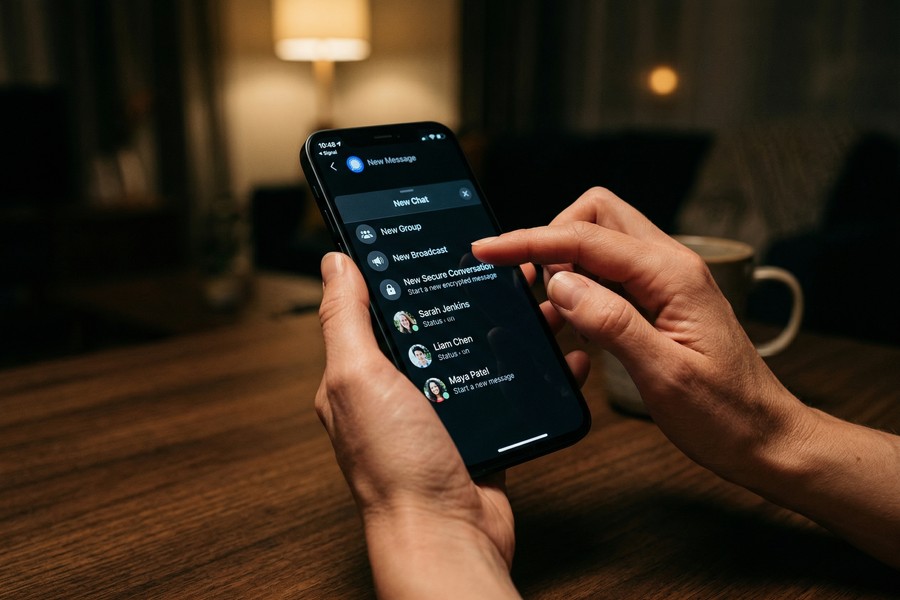
Step-by-Step: Telegram Secret Chat Setup
- Open Telegram on your phone (Secret Chat is mobile-only).
- Tap the pencil or compose icon to start a new conversation.
- Select New Secret Chat from the menu.
- Choose your contact from the list.
- Wait for the contact to come online and accept — Secret Chats require both parties to be active for the encryption handshake.
- Once connected, tap the clock icon inside the chat to set a self-destruct timer for messages.
A key limitation: if the recipient is offline, the Secret Chat request will remain pending. Unlike standard Telegram chats, Secret Chats cannot be forwarded, and screenshots are blocked on Android (though iOS does not enforce this restriction at the OS level). According to Telegram’s official API documentation, Secret Chat sessions use MTProto 2.0 with 256-bit symmetric AES encryption.
How Do You Lock Down a Secret Chat on WhatsApp?
WhatsApp applies end-to-end encryption to all conversations by default, but a complete secret chat setup requires activating several additional privacy layers. The most important are Chat Lock, disappearing messages, and View Once media.
Step-by-Step: WhatsApp Privacy Hardening
- Open the target chat in WhatsApp.
- Tap the contact name at the top, scroll down, and select Chat Lock. Authenticate with biometrics or your device PIN.
- Return to the chat, tap the contact name again, and select Disappearing Messages. Choose 24 hours, 7 days, or 90 days.
- For media, tap the “1” icon next to the text field when sending photos or videos to enable View Once mode — recipients cannot save or forward the file.
- Go to WhatsApp Settings > Privacy and disable Read Receipts and set Last Seen to “Nobody.”
One important caveat: WhatsApp is owned by Meta and shares certain metadata — such as contact lists and usage frequency — with Meta’s advertising infrastructure, even though message content is encrypted. This is documented in WhatsApp’s current privacy policy. For users who require metadata privacy as well as content privacy, Signal or Wire are more appropriate choices.
If you are also curious about controlling message visibility after sending, our guide on how to unsend a message without the other person knowing covers platform-specific unsend features in detail.
WhatsApp processed over 100 billion messages per day as of 2023, according to Meta’s annual report. Despite its scale, the platform’s default E2EE means that message content — in isolation — remains private from WhatsApp’s own servers.
Does Secret Chat Setup Differ Between Android and iOS?
The core secret chat setup process is nearly identical on Android and iOS for Signal, Telegram, and WhatsApp — but OS-level differences affect screenshot blocking, notification previews, and biometric lock behavior. Android offers more granular app permission controls, while iOS enforces stricter sandboxing by default.
Key Platform Differences
On Android, Signal and Telegram can block screenshot capture within the app itself using the FLAG_SECURE display flag. This is a meaningful protection — it prevents screen-recording tools from capturing chat content. On iOS, Apple’s architecture does not allow apps to block screenshots at the OS level, so screenshot blocking is not enforced for any messaging app.
iOS users benefit from iCloud Backup awareness: if iCloud Backup is enabled, WhatsApp chat backups may be stored in iCloud in a form that is not end-to-end encrypted (depending on whether the user has enabled Advanced Data Protection). Apple introduced full end-to-end encrypted iCloud backups in 2022 via Apple’s Advanced Data Protection feature, but it must be opted into manually. If you use WhatsApp and want full backup privacy on iOS, enable Advanced Data Protection under Settings > Your Name > iCloud > Advanced Data Protection.
“The biggest vulnerability in most ‘secret chat’ setups is not the encryption itself — it is the backup. If your encrypted messages are backed up to a cloud service without independent encryption, the messages are only as secure as that cloud account.”
For a broader comparison of apps that handle these concerns well, see our full breakdown of the best encrypted messaging apps for privacy.

What Are the Most Common Secret Chat Setup Mistakes?
The most common secret chat setup mistake is treating app-level encryption as the only required protection. Device-level security, backup settings, and contact verification each play equally important roles in a complete privacy configuration.
Mistakes That Undermine Secret Chat Privacy
- Skipping contact verification: Both Signal and Telegram provide safety numbers or key fingerprints to verify that no man-in-the-middle attack has occurred. Most users never check these. In Signal, tap a contact’s name, then View Safety Number and compare it with your contact in person or via a separate channel.
- Leaving cloud backups unencrypted: As noted above, WhatsApp and SMS backups stored in Google Drive or iCloud may not be E2EE by default. Disable app-level backups or enable full-device encrypted backups.
- Not locking the app itself: Anyone who picks up your unlocked phone can read your secret chats. Enable biometric or PIN lock inside each app’s privacy settings — this is separate from your device lock screen.
- Using regular Telegram chats and assuming they are private: Standard Telegram “cloud chats” are stored on Telegram’s servers and are not end-to-end encrypted. Only Secret Chat mode provides E2EE.
- Ignoring metadata: Who you message, when, and how often is often as revealing as the content. Apps like Signal minimize metadata collection; WhatsApp and Telegram do not.
For users who also rely on disappearing messages as a privacy mechanism, our guide on how to send disappearing messages on any device covers timer configuration across all major platforms in detail.
According to the Electronic Frontier Foundation’s Surveillance Self-Defense guide, metadata — including contact lists, communication frequency, and timestamps — can reveal sensitive personal information even when message content is fully encrypted.
If your goal is privacy in a professional context, it is also worth reviewing our analysis of the best messaging apps for business teams, which addresses compliance, auditability, and encryption together.
Frequently Asked Questions
Is a secret chat truly impossible to intercept?
No communication method is 100% uninterceptable, but a properly configured secret chat setup comes close. If both devices are secure, the app uses verified E2EE, and no cloud backups are unencrypted, the practical interception risk is extremely low for most threat models.
Can the other person screenshot a secret chat?
On Android, Signal and Telegram (Secret Chat mode) can block screenshots at the app level using system flags. On iOS, Apple’s OS does not allow apps to block screenshots, so recipients can always take one. Disappearing messages reduce — but do not eliminate — the screenshot risk.
Does secret chat setup work across different phones?
Yes, cross-platform secret chats work on Signal (iOS to Android and vice versa) and WhatsApp. Telegram Secret Chats are tied to a specific device session, so if a contact switches devices, a new Secret Chat must be started. Wire also supports cross-platform encrypted sessions without device restriction.
What happens to secret chat messages if I delete the app?
For Signal and Telegram Secret Chats, messages are stored only on the device — deleting the app permanently erases the conversation unless you have created a local backup. WhatsApp may retain a backup in Google Drive or iCloud depending on your settings. Always check and disable backups before uninstalling if privacy is the goal.
Does using a VPN improve secret chat security?
A VPN masks your IP address and network traffic from your ISP but does not affect the encryption of messages inside the app itself. Using a reputable VPN adds a useful layer against network-level surveillance but is not a substitute for a proper secret chat setup with E2EE and disappearing messages enabled.
Are secret chats on Telegram available on desktop?
No. Telegram’s Secret Chat mode is exclusively available on mobile apps (iOS and Android). The desktop client supports only cloud-based, non-E2EE chats. If you need encrypted desktop messaging, Signal’s desktop app encrypts all conversations by default.
How do I verify my secret chat has not been compromised?
Both Signal and Telegram provide key verification tools. In Signal, open a conversation, tap the contact name, and select View Safety Number. Compare the displayed code with your contact directly. A mismatch indicates a potential man-in-the-middle attack and the session should be ended immediately.
Sources
- Pew Research Center — How Americans View Data Privacy
- Signal — Signal Protocol Documentation
- Telegram — End-to-End Encryption API Documentation
- WhatsApp — Security Overview
- Electronic Frontier Foundation — Messaging Apps: What Data Can They See?
- Electronic Frontier Foundation — Surveillance Self-Defense Guide
- Apple Support — Advanced Data Protection for iCloud
- Signal Support — Disappearing Messages
- Internet Society — 2024 Encryption Report
- WhatsApp — Privacy Policy






