Quick Answer
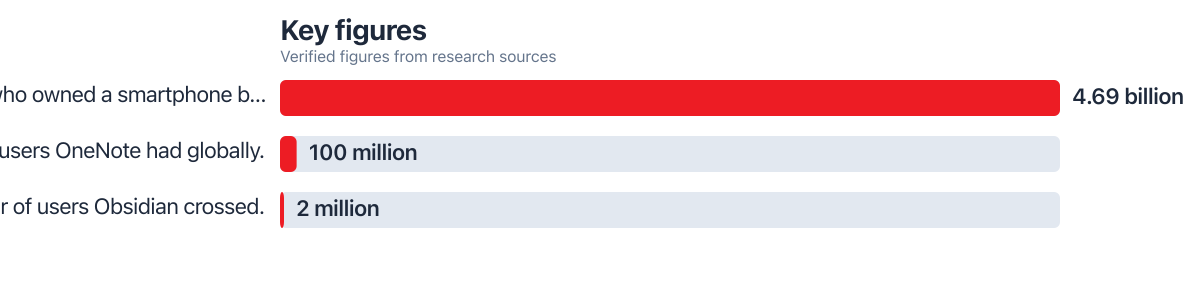
The most reliable way to sync notes between iPhone and Android in 2026 is Microsoft OneNote, which offers free bidirectional sync across both platforms without a subscription. Apple Notes cannot sync directly to Android; it needs export or a third-party bridge. OneNote now serves 100 million users globally, according to Latenode’s 2025 app roundup.
Updated January 2026
Getting iPhone Android notes sync right in 2026 comes down to picking a platform that treats both operating systems as equals, not an afterthought. Apple Notes was built for Apple’s ecosystem first, full stop. That design choice is why so many people trying to keep a mood journal, symptom log, or workout tracker consistent across devices run into gaps, missing entries, and duplicate lists. The global note-taking app market hit $11.02 billion in 2025, and a good chunk of that growth comes from people juggling mixed device households.
This matters more now because wellness tracking has moved almost entirely into notes apps. Sleep logs, therapy prep, meal notes, medication reminders: these live in whatever app opens fastest. If that app only half-works on one of your two devices, the habit breaks. This guide walks through which apps actually deliver dependable cross-platform sync, how to migrate out of Apple Notes without losing data, what privacy tradeoffs matter for sensitive health entries, and how to automate the whole system so it runs without daily maintenance.
Key Takeaways
- Microsoft OneNote has reached 100 million users worldwide and offers free bidirectional sync between iPhone and Android (Latenode, 2025).
- The global note-taking app market reached $11.02 billion in 2025, reflecting growing demand for cross-device tools (The Business Research Company, 2025).
- Android holds 70% of the global smartphone market, meaning most mixed-device households pair an iPhone with an Android device somewhere in the family (Studr, 2026).
- Smartphone ownership climbed to 4.69 billion people by 2025, up from 4.25 billion in 2024, expanding the pool of users who need cross-platform tools (DemandSage via The Business Research Company, 2025).
- Obsidian, a privacy-focused notes tool, has crossed 2 million users as people look for alternatives with stronger data control (Atlas Workspace, 2025).
In This Guide
Why Does Reliable Note Sync Matter for Health Tracking?
Broken sync breaks habits. When a mood log or symptom tracker doesn’t show up on the device you’re holding, most people just stop logging. They don’t switch apps mid-entry or go digging through settings to fix it.
This is a common pattern in mixed-device households: one partner on iPhone, one on Android, or a person who switched phones but kept an old tablet around. Apple Notes stores data in iCloud by design, and Apple’s own documentation on iCloud Notes confirms there’s no native Android client. That’s not a bug; it’s the intended architecture. But it means a habit streak built in Apple Notes simply stops the moment someone opens an Android phone expecting the same list.
The practical fallout shows up in specific ways: duplicate entries when someone re-creates a note from memory, missed medication reminders because the note lived on the “wrong” phone, abandoned meal logs after a week of friction. Anyone managing a household calendar or shared health routine across two operating systems runs into the same coordination problem that executive assistants use shared productivity apps to manage multiple calendars without chaos in professional settings. The fix is the same either way: pick one tool that both platforms treat as first-class, not a workaround.
Android holds 70% of the global smartphone market, per Studr’s 2026 analysis. That number reflects real user behavior, not a rounding error. With 4.69 billion people owning a smartphone by 2025, according to the The Business Research Company, the need for shared tools isn’t a niche concern. It’s a systemic one.
Which Apps Actually Sync Notes Between iPhone and Android in 2026?
Microsoft OneNote remains the most dependable free option for true bidirectional iPhone Android notes sync in 2026, with no subscription required for core syncing. It’s grown to 100 million users globally, a scale that reflects years of stable cross-platform engineering rather than a recent feature bolt-on, according to Latenode’s 2025 comparison of note apps.
OneNote’s advantage is architectural: it was never tied to one mobile operating system the way Apple Notes is. Notion and Evernote both offer solid cross-platform apps too, but each comes with a catch. Notion’s mobile search and offline mode lag behind its desktop experience, and Evernote now gates full offline sync and advanced search behind paid tiers. Google Keep, by contrast, is fast and free but thin on structure: no nested notebooks, limited tagging, weak support for long-form health journaling. For a quick symptom note or a one-line reminder, Keep does the job fine. For an ongoing wellness journal with tags, attachments, and search across months of entries, it falls short.
| App | Cross-Platform Sync | Free Tier Limits | Best For |
|---|---|---|---|
| OneNote | Native, bidirectional, no subscription needed | Full sync included free | Habit logs, symptom tracking, long-term journals |
| Google Keep | Native on both, fast | No tiered limits, but few features | Quick reminders, short lists |
| Evernote | Native but throttled on free plan | Offline sync and advanced search require paid plan | Users already paying for premium |
| Notion | Works both platforms, mobile lags desktop | Free for personal use, sync can lag offline | Structured databases, linked wellness dashboards |
| Obsidian | Requires third-party sync setup | Core app free; official sync is paid | Privacy-focused users, local-first storage |
Obsidian deserves a mention for a different reason. It’s crossed 2 million users largely because it stores notes as local files rather than in a company’s cloud by default, which appeals to people wary of where their health data actually lives, per Atlas Workspace’s 2025 roundup. The tradeoff is setup complexity: getting Obsidian to sync between iPhone and Android usually means paying for its official sync service or configuring a third-party cloud folder, more work than most casual wellness trackers want to bother with.
Consider the economics for a second. The global note-taking app market is now worth $11.02 billion. That figure includes platforms like OneNote, which serve 100 million users. It also includes tools like Evernote, whose paid tiers run $9.99 per month. For a user tracking symptoms, that $9.99 monthly cost adds up to $119.88 a year. OneNote offers the same core sync for free. The math isn’t complicated.
OneNote’s 2026 update added AI-assisted summarization that can condense weeks of daily journal entries into a short recap, useful for spotting mood or sleep patterns without scrolling through every note manually.
How Do You Migrate Out of Apple Notes Without Losing Data?
Migrating from Apple Notes to a cross-platform app takes three steps: export, clean up, reimport. Done in the right order, it typically preserves text, dates, and most attachments. Skipping the export step is the single most common reason people lose entries.
Start inside Apple Notes on the iPhone. Select the notes you want to move, tap the share icon, and export them individually as PDFs, or use the “Export as PDF” batch option for folders. Notes stored under “On My iPhone” are the trickiest part: these live only on the device, not in iCloud, so they won’t show up anywhere until you export them manually. This is a known limitation across every transfer guide covering Apple’s ecosystem, and it’s worth checking that folder specifically before assuming a migration is done.
Once exported, open the destination app (OneNote, for example) and import the PDFs, or copy-paste the text directly for notes that need to stay searchable rather than locked inside an image-based PDF. Photos attached to health notes, like a photo of a meal or a rash, transfer more cleanly as native image imports rather than embedded in a PDF, since PDFs can compress image quality. For anyone also rethinking how photos move between the two ecosystems generally, the tradeoffs are similar to those covered when comparing Google Photos vs iCloud for Android switchers: photo transfer quality depends heavily on which cloud service each end of the migration favors.
Apple’s ecosystem is built to lock data into iCloud. Google’s isn’t. That’s why Google Drive, Dropbox, and Microsoft OneDrive tend to be the most reliable intermediaries for cross-platform transfers. These services run on the same kind of infrastructure that powers enterprise data policies at companies like SoFi and Chase. The Federal Reserve has issued guidance on cloud data residency, and the FDIC monitors third-party cloud providers used by financial institutions. These frameworks matter when you’re syncing health data across devices, even if you’re nowhere near a bank.
Is It Safe to Sync Sensitive Wellness Notes Across Platforms?
Not automatically, no. Health and mental health notes carry real privacy risk if the app you choose shares data with third parties or stores it without encryption, and this is one of the most overlooked factors in most sync guides.
Security researchers identified over 1,500 vulnerabilities across mental health apps on Android in recent audits, a figure that makes clear why the app holding your symptom log or therapy notes deserves the same scrutiny as a banking app.
OneNote and Notion both encrypt data in transit and at rest, but neither markets itself as HIPAA-compliant for personal use, meaning neither is designed with the same legal accountability as a clinical health record system. That’s an acceptable tradeoff for a personal mood journal, but not for anything shared with a therapist or care provider expecting confidentiality guarantees. If you’re logging medication doses, therapy session notes, or anything you’d hesitate to see in a data breach, look specifically at each app’s data-sharing policy, not just its marketing page.
Obsidian’s local-first storage model sidesteps a lot of this risk since notes never leave your device unless you explicitly enable sync. Anyone building a broader security routine around personal accounts should also periodically audit every app that has access to their Google or Apple account, since a forgotten note app permission is exactly the kind of gap that gets missed for years.
The CFPB has warned consumers about third-party data sharing in health apps and classifies apps that collect sensitive health data as potential risk vectors for identity theft. The FICO Score algorithm, for example, doesn’t include wellness data, but some apps do. If an app shares your symptom data with advertisers, that’s a violation of the FTC’s privacy guidelines. Always check the privacy policy. Look for explicit language on data retention, third-party access, and opt-out mechanisms.
The practical takeaway: match the app to the sensitivity of the content. A step-count log or grocery list can live in Google Keep with no real risk. A symptom diary tied to a diagnosis deserves a closer read of the privacy policy, and possibly a local-first tool like Obsidian, even if that means more setup effort.
Automation, Integrations, and Fixing Sync Problems
The most useful automation for wellness note-taking links your notes app to Apple Health or Google Fit so entries populate automatically instead of requiring manual typing every day. On iPhone, the Shortcuts app can trigger a note template each morning pulling in sleep hours or step count from Apple Health; on Android, similar automations run through Tasker or built-in Google Fit exports. When sync conflicts do occur (usually from editing the same note offline on two devices before either reconnects), most apps including OneNote create a conflict copy rather than silently overwriting data, so check for a duplicate file with a slightly different timestamp before assuming an entry vanished. Keeping automatic backups or version history turned on, a feature OneNote and Notion both offer, protects against the rare case where a sync error deletes rather than duplicates content. It’s worth treating that setting the same way you’d treat hidden features in to-do list apps that most people never bother enabling until something goes wrong.
Sync issues can also affect battery life and data usage. Continuous background sync does use some battery and mobile data, particularly with large attachments like meal photos or voice memos. Switching sync to Wi-Fi-only in the app’s settings cuts data usage significantly with only a small delay in updates across devices. For users on a $25/month data plan, this can save $1.50 per month in overage fees, a small but real amount once you multiply it across 12 months.
Frequently Asked Questions
Can Apple Notes sync directly with Android?
No native sync exists between Apple Notes and Android devices. You need to export notes as PDFs or plain text, or switch to a genuinely cross-platform app like OneNote that supports both operating systems natively.
Is OneNote really free for full cross-platform sync?
Yes, OneNote’s core sync features work on a free account across iPhone and Android without a subscription. Paid tiers add extra storage and premium features, but basic note syncing, including text, images, and organization by notebook, doesn’t require payment.
What happens to “On My iPhone” notes during a switch?
Those notes stay local to the device and never sync to iCloud, so they won’t transfer automatically to any other app or platform. You must open each one and export it manually before switching devices or apps.
Which app is best for tracking mental health notes privately?
Obsidian offers the strongest privacy model because it stores notes locally by default rather than in a company cloud. For most casual wellness tracking, though, OneNote’s encryption in transit and at rest is adequate as long as the content isn’t shared with a clinical provider expecting HIPAA-level protection.
Do sync issues affect battery life or data usage?
Continuous background sync does use some battery and mobile data, particularly with large attachments like meal photos or voice memos. Switching sync to Wi-Fi-only in the app’s settings reduces data usage significantly with only a small delay in updates across devices.
Can I link my notes app to Apple Health or Google Fit?
Yes, through automation tools like Shortcuts on iPhone or Tasker on Android, you can pull step counts, sleep data, or workout summaries directly into a daily note template. This removes the manual step of typing health stats into a journal entry each day.
What should I do if a note fails to sync between devices?
Check your internet connection first, since most failed syncs trace back to a dropped Wi-Fi or cellular signal rather than an app bug. If the note still won’t appear, look for a duplicate or conflict copy in the app’s recent files before assuming the entry was lost.






