
Quick Answer
Auto-reply messages during short mental breaks work because they remove the anticipatory anxiety of missed pings. With focused work sessions averaging just 13 minutes 7 seconds in 2025, protecting even a 20-minute break with a clear away message helps attention reset instead of fragmenting further.
Updated July 2026
This piece is part of the Mindful Messaging cluster inside our broader guide, How Messaging Apps Can Support Long-Term Mental Wellness. That guide covers the full picture of how messaging habits shape mental health. Here, the focus narrows to one specific habit: setting auto-reply messages during short mental breaks, not vacations or sick days, and how that small habit changes attention afterward.
Most advice on auto-replies stops at the out-of-office message you set before a two-week vacation. That’s not what this article covers. Instead, this is about the 20, 30, or 45-minute pause you take mid-afternoon to walk, breathe, or just sit without a screen. Auto-reply messages during mental breaks for focus serve a narrow but real purpose: they let your brain actually disengage instead of half-watching for the next buzz. That distinction matters because most people never apply away messages to routine wellness pauses, even though the interruption risk is nearly the same as a longer absence.
Key Takeaways
- Average focused work sessions dropped to just 13 minutes 7 seconds in 2025, according to ActivTrak’s State of the Workplace report.
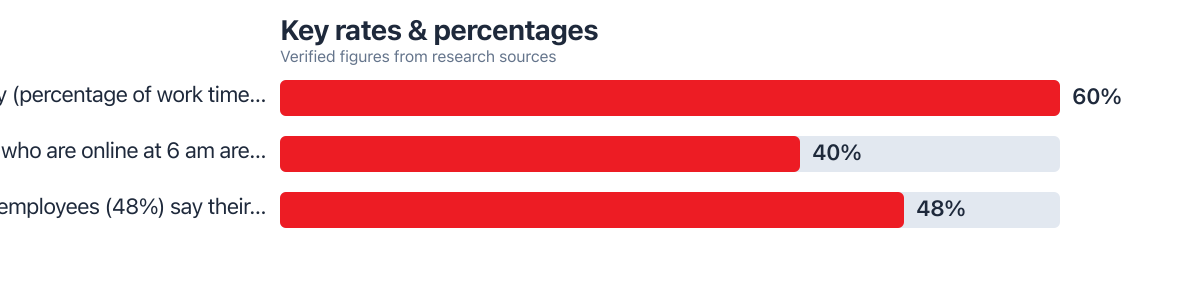
- Focus efficiency fell to 60%, a three-year low, per the same ActivTrak data.
- Workers get roughly 153 Teams messages per weekday, based on Microsoft’s Work Trend Index, which is a steady stream even a 20-minute walk has to compete with.
- Nearly half of employees, 48%, describe their workday as chaotic and fragmented, according to Microsoft’s research, a pattern short unprotected breaks tend to reinforce rather than fix.
The Hidden Cost of Unchecked Notifications During Breaks
Unmanaged notifications during a break don’t just interrupt you; they cancel the break’s purpose before it starts. A ping at minute three of a ten-minute pause pulls attention right back to the inbox, and the brain never gets past the initial settling phase. This is the core problem auto-reply messages during mental breaks for focus are meant to solve.
Work sessions are already short. The average focused stretch at work lasted just 13 minutes 7 seconds in 2025, according to ActivTrak’s workplace data. If breaks get chopped up the same way, there’s no recovery window left anywhere in the day. Focus efficiency, the share of work time spent in genuinely uninterrupted activity, slid to 60% in 2026, a three-year low per the same source. That’s not a coincidence; it’s what happens when neither work nor rest gets protected space.
The stress response tied to this is well documented. Even brief pauses lose most of their restorative value when a person keeps checking for replies or bracing for a notification. A break spent glancing at a phone every ninety seconds isn’t rest; it’s low-grade vigilance dressed up as downtime. This is one reason the group messaging habits covered in our related piece on one phone work personal life: stress trade tend to blur boundaries that used to be clearer with separate devices.
Notification load compounds this. Microsoft’s Work Trend Index found the average worker receives 153 Teams messages per weekday, and 40% of people online at 6 a.m. are already reviewing email for the day’s priorities, per Microsoft’s 2025 research. Against that backdrop, a 20-minute break with no signal to senders that you’re stepping away is fighting an uphill battle from the start.
How Auto-Reply Messages Create Protected Space for Recovery
An auto-reply during a break does one specific job: it tells the sender not to expect an immediate answer, which removes the reason to keep checking. That single signal changes the psychological experience of the break from “waiting” to “actually away.” The distinction between a short wellness pause and a full-day absence matters here; a 20 to 45-minute break needs language that’s brief and low-stakes, not the formal, date-stamped structure of a vacation auto-reply.
The mechanism is anticipatory anxiety reduction. When people know a reply won’t come for a defined window, the pressure to monitor drops sharply. This is the same principle behind scheduled communication habits discussed in our companion article on switch whatsapp telegram, where predictable message handling reduces the compulsion to check constantly. The break itself becomes something closer to genuine rest instead of a pause with one foot still in work mode.
Phrasing Auto-Replies for Short Breaks Versus Full Days Off
Short-break auto-replies need different wording than vacation messages, and treating them the same is a common mistake. A vacation reply can be formal and detailed with return dates and backup contacts. A 20-minute wellness pause needs something shorter, lower-stakes, and normalized, not apologetic.
A workable template: “Stepping away for a short focus break, back by [time]. I’ll reply once I’m back at my desk.” No over-explanation, no need to justify the break as a health matter. Framing it as routine, the way someone might mention stepping into a meeting, reduces any stigma around taking a wellness pause during a normal workday. This stigma-reducing framing is one of the more overlooked pieces of the puzzle; most guidance online only covers OOO messages for sick days or PTO, not the daily 30-minute reset.
The Focus Connection: Why Protected Breaks Sharpen Attention Afterward
Protected breaks lead to sharper attention afterward because the brain gets a genuine chance to shift out of task-focused mode. Neuroscience research on the default mode network shows this internally-directed state, associated with reflection and creative recovery, only activates when external demands are quiet. A break spent checking messages every few minutes keeps the brain in a reactive mode, never quite reaching that restorative state.
This matters more given how fragmented the average workday already is. With 48% of employees describing their work as chaotic and fragmented, per Microsoft’s Work Trend Index, breaks are one of the few places left in the day where a person has some control over interruption. Auto-replies extend that control from the break itself into the surrounding fifteen minutes, since senders stop expecting instant answers and the anticipatory checking fades.
Consider a straightforward comparison. A worker who takes four unprotected 15-minute breaks a day, each interrupted twice by messages requiring a reply, loses roughly two minutes of re-focus time per interruption, based on typical context-switching estimates used in workplace research. That’s eight interruptions and about sixteen minutes of lost re-focus time daily, which adds up to over an hour a week, purely from breaks that weren’t shielded by a simple auto-reply.
Practical Ways to Implement Auto-Replies for Everyday Breaks
Implementation depends on the platform, and email is only part of the picture. Most guidance online treats auto-replies as an email-only feature, but mobile-first messaging apps like iMessage and WhatsApp, along with Focus modes on iPhone, cover far more of the daily interruption load than inbox pings do. Setting a temporary status message in Slack or Teams, or turning on a custom Focus mode with an auto-response on iPhone, extends the same protection to the apps people actually check most during the workday. Our guide on beyond do not disturb: advanced iPhone controls covers some of the deeper settings worth exploring for this.
For teams that lean on Slack or Teams status updates, a custom status like “Focus break until 2:15” paired with notification snoozing does the same job as an email auto-reply, just in a channel people check more often. Executive assistants managing multiple calendars have used similar micro-scheduling tactics, as covered in our piece on how executive assistants use shared productivity apps to protect blocks of time without creating confusion for the people relying on them.
Potential Drawbacks and Team Culture Edge Cases
Auto-replies aren’t a fit for every role or every moment, and pretending otherwise oversells the idea. In client-facing jobs, or team cultures that treat any “unavailable” status as a red flag, a 20-minute auto-reply can raise more questions than it answers. Some managers read status messages like “on a break” as a sign of low commitment, even when the actual time lost is minimal. If that’s the norm at your workplace, a quieter approach, like snoozing notifications without a visible status change, may work better than an explicit auto-reply.
There’s also a real difference between internal messages and urgent client requests. A break-time auto-reply should probably route or flag anything time-sensitive differently than routine internal chatter. Teams already dealing with delayed response patterns tend to see more stress build-up, a pattern explored in the sibling article on group messaging delays and stress in remote workers, where the anxiety often comes less from the break itself and more from ambiguity around when a reply will actually come.
Weigh the trade-off honestly: auto-replies reduce anticipatory anxiety for the sender, but they can create a small lag in perceived responsiveness. For most routine internal work, that lag is trivial. For high-stakes client relationships, it may need a backup contact or an urgent-only exception built into the message itself.

Long-Term Wellness Gains from Consistent Boundary Habits
Consistency is where the real payoff shows up. A single protected break barely registers, but doing this daily, across weeks, builds a habit that compounds against burnout. Micro-breaks under ten minutes have been shown to reduce fatigue and support focus specifically when interruptions during them are minimized, which is the exact condition an auto-reply creates.
Compare this to other focus techniques people already use, like app blockers or Pomodoro timers. Those tools control your own access to distractions; auto-replies control the inbound side, managing what other people expect from you during that window. Used together, they cover both directions of interruption, and neither one substitutes fully for the other. Our piece on the deep work method: knowledge workers use to build distraction-free blocks pairs well with this idea, since protected breaks are really the recovery half of the same equation.
Over months, this habit shows up less as a single dramatic improvement and more as fewer chaotic afternoons, less residual anxiety at the end of the day, and slightly steadier attention going into the next task. It’s a modest habit with a real return, not a fix for deeper burnout on its own, but a genuinely useful piece of the picture.
Frequently Asked Questions
How long should an auto-reply be active for a short mental break?
Match it to the actual break length, typically 15 to 45 minutes. Setting it for longer than needed can create unnecessary confusion about your availability once you’re actually back.
Will using auto-replies for short breaks make me look less responsive at work?
It depends heavily on team culture. In most modern remote or hybrid settings, a brief status update is read as organized rather than unavailable, though in cultures that expect instant replies, a quieter notification snooze may be safer.
Can I use auto-replies on messaging apps like Slack or iMessage, not just email?
Yes, and this is often more useful than email alone since most daily interruptions now come through chat apps. Custom status messages in Slack or Teams, combined with iPhone Focus modes, cover far more of the actual interruption load than an email auto-responder does on its own.
How do I handle urgent requests while my auto-reply is active during a break?
Add a one-line exception, such as directing truly urgent matters to a specific contact or channel. This keeps the boundary intact for routine messages while still leaving a path open for anything genuinely time-sensitive.
Is there a way to measure if auto-replies are actually improving my focus after breaks?
Track how long it takes to re-engage with your first task after a break, informally over a week or two. If unprotected breaks were leaving you distracted for several minutes afterward and that gap shrinks once you start using auto-replies, that’s a reasonable sign the habit is working.






