Fact-checked by the SnapMessages editorial team
A 2025 analysis by NowSecure found that 62% of Android apps tested request at least one dangerous permission, meaning direct access to storage, SMS, camera, microphone, or precise location. That figure comes from a sample of 378,000 apps, and it does not even account for the data quietly gathered by third-party SDKs bundled inside those apps. For anyone who has downloaded a sleep tracker, meditation guide, or nutrition log in the past few years, that number deserves real attention. Conducting an app permissions audit is the single most effective way to see exactly what you have already handed over.
The exposure runs deeper than most users expect. According to the 2025 App Privacy Index by Tenscope, 75% of the top 100 free apps in the US Apple App Store collect data specifically to follow users across other apps and websites, primarily for advertising. A separate NowSecure finding from August 2025 shows that 35% of iOS apps tested failed to disclose the data they actually collected, and 97% were missing required Privacy Manifests for their third-party SDKs. That last figure is striking: nearly every iOS app has undisclosed data collection buried in components the user never knew existed. For health and wellness apps specifically, this is not an abstract concern. Period trackers, therapy chatbots, and calorie counters process some of the most intimate data in your life, yet most of them sit entirely outside HIPAA’s jurisdiction.
This guide walks you through how to run a thorough permissions review on both iOS and Android, what the riskiest permissions look like in a wellness context, and what to do after you revoke access. You will also find the steps most audit guides skip entirely: reviewing the hidden Health app permission layer, understanding why deleting an app is not the same as deleting your data, and knowing which state laws give you an actual right to demand that deletion.
Key Takeaways
- 62% of Android apps in a 378,000-app NowSecure study request at least one dangerous permission (storage, SMS, camera, microphone, or precise location).
- 75% of the top 100 free US App Store apps collect data to track users across other apps and websites for advertising, per the 2025 App Privacy Index.
- 35% of iOS apps tested in August 2025 failed to disclose the data they collected, and 97% were missing required Privacy Manifests for third-party SDKs.
- 73% of survey participants across 25+ countries told GoodFirms in June–July 2025 that it bothers them when apps request data-collection permissions, yet most users never revoke them after granting access.
- Most consumer wellness apps, period trackers, sleep monitors, mental health chatbots, are not HIPAA-covered entities, meaning they can legally share sensitive health data with advertisers under broadly worded privacy policies.
- The FTC’s amended Health Breach Notification Rule, effective July 29, 2024, now extends breach-notification obligations to fitness, fertility, and mental health apps that operate outside HIPAA, giving users a federal reporting mechanism if unauthorized sharing occurs.
In This Guide
- Why Your Wellness Apps Know More About You Than Your Doctor Does
- What Permission Creep Actually Looks Like in a Wellness App
- Before You Touch a Single Toggle: How to Read What Your App Actually Collects
- The Step-by-Step App Permissions Audit for iOS and Android
- The High-Risk Permissions Specific to Health and Wellness Apps
- What to Do After the Audit: Revoke, Delete, and Request Data Removal
- Building a Personal Privacy Standard for Every New Wellness App You Download
- Keeping the Audit Habit: Schedules, Triggers, and Tools
Why Your Wellness Apps Know More About You Than Your Doctor Does
Your primary care physician is legally bound to protect your records under HIPAA (the Health Insurance Portability and Accountability Act). Your meditation app is not. That gap is more significant than most users realize. Consumer wellness applications, step trackers, nutrition logs, sleep monitors, mental health chatbots, period trackers, are almost never HIPAA-covered entities, which means they are not subject to the same data-sharing restrictions that govern hospital records or pharmacy data. They operate instead under their own privacy policies, which are often written broadly enough to permit sharing with advertisers, analytics firms, and data brokers.
The downstream risks are specific and serious. Health app data has surfaced in insurance underwriting contexts, employer screening pipelines, and hyper-targeted ad profiles. A broadly worded privacy policy that includes phrases like “trusted business partners” or “service providers” can legally cover a data broker. When a wellness app records your sleep quality, mood scores, exercise habits, or reproductive cycle, that information does not stay siloed the way your medical records would. The FTC’s enforcement action against Flo Health is the clearest public example: the company transmitted users’ menstrual and pregnancy data directly to Facebook and Google despite explicit promises of confidentiality, confirming that this is a real-world risk, not a hypothetical one.
The FTC’s amended Health Breach Notification Rule, effective July 29, 2024, does extend breach-notification obligations to fitness, fertility, and mental health apps outside HIPAA. This is meaningful progress, but notification after a breach is not the same as prevention. The time to act is before data leaves your device, which is exactly what a permissions audit is designed to address.
The Aggregation Effect
A single data point, say, your resting heart rate, is not very revealing. Combine it with sleep duration, stress scores, location patterns, and a menstrual cycle log, and a data broker can make surprisingly accurate inferences about your physical health, mental state, and reproductive status. Wellness apps, by design, collect multiple data types simultaneously. That aggregation is what makes them valuable to advertisers and, frankly, what makes them higher-stakes than a simple game app requesting your contacts.
Most consumer mental health apps, including AI therapy chatbots, are not classified as medical devices and are therefore exempt from both HIPAA and FDA oversight, even when they collect detailed symptom logs and mood histories.
What Permission Creep Actually Looks Like in a Wellness App
Permission creep is the slow, often invisible accumulation of access rights over time. An app that legitimately needed location access to map your running route in 2022 may have updated its data practices twice since then, adding analytics SDKs that transmit that location data to third parties you have never heard of. The app still works the same way. Nothing in the interface signals the change. Your permission settings say “Location: Always” just as they did at install, but what happens to that data on the server side has quietly shifted.
App updates are the primary vehicle for this. Each update can introduce new third-party SDKs, small code libraries for advertising, analytics, crash reporting, or A/B testing, that begin collecting data even when you never use the feature that triggered their inclusion. These SDKs often have their own data-sharing relationships that the parent app’s privacy policy does not clearly describe. The NowSecure finding that 97% of iOS apps were missing required Privacy Manifests for their third-party SDKs reflects exactly this problem: the apps themselves may not fully know what those embedded components are doing.
Acquisitions as a Silent Privacy Change
This is an angle almost no audit guide addresses, so it is worth being direct about: acquisitions change data practices without any visible signal to the user. An app that was genuinely privacy-respecting at install can be acquired by an ad-tech company or a data broker, after which its privacy policy is quietly revised in a subsequent app update. You agreed to the new terms the moment you tapped “Update.” No notification. No new permission request. If you want to understand your true current exposure, checking an app’s ownership history is a legitimate part of the audit. A quick search for “[app name] acquired” takes about 90 seconds.
Wellness-specific examples ground this concretely. A period tracker sharing pregnancy week data with Facebook and Google (as Flo did) is not an edge case, it is the documented result of routine ad-tech SDK integration. A meditation app granting microphone access that outlasts your active use sits quietly in the background, its permission unchanged, long after you have stopped opening the app. The permissions you set on day one are not the permissions that matter most. What matters is the permissions that remain set after two years of updates, policy changes, and corporate restructuring.
Apps you have not opened in months still retain every permission you granted them. A wellness app sitting dormant on your phone can continue accessing location, microphone, or health data in the background unless you actively revoke those permissions or delete the app.

Before You Touch a Single Toggle: How to Read What Your App Actually Collects
Both major app stores now provide standardized privacy disclosures that you can consult before installing anything. Apple’s App Privacy nutrition labels divide data into three categories: Data Used to Track You (shared with third parties or used for advertising across apps); Data Linked to You (collected and associated with your identity); and Data Not Linked to You (collected but anonymized, in theory). For a health app, the distinction between the first two categories is the one that matters most. If a calorie-tracking app lists health and fitness data under “Data Used to Track You,” it is explicitly telling you that information feeds advertising profiles.
Google Play’s Data Safety section uses similar categories: data shared with third parties, data collected, and whether data is encrypted in transit. Both systems are imperfect. They rely on developer self-reporting, and the NowSecure finding that 35% of iOS apps failed to accurately disclose collected data confirms the labels are not always accurate. Still, they are the best standardized screening tool available before install, and they take under two minutes to check.
The One-Question Filter for Any Permission Request
When an app asks for a permission, ask one question: does this specific feature require this specific data to function? A medication-management app has no legitimate reason to request contacts or microphone access. A calorie counter does not need your precise location. A sleep timer does not need access to your photos. Any utility-style health tool requesting camera, microphone, or precise location warrants a specific explanation before you grant it. If the app does not provide one, and most do not, that is a signal worth taking seriously.
Getting comfortable with reading these labels before installing also pairs well with the broader habit of building a personal digital security routine, the pre-install check becomes automatic once it is part of a consistent process rather than a one-off reaction to a news story.
73% of survey participants across 25+ countries said it bothers them when apps ask for data-collection permissions, according to a GoodFirms survey from June–July 2025. Yet granting and forgetting remains the dominant behavior, most users never return to revoke permissions after the initial install.
The Step-by-Step App Permissions Audit for iOS and Android
The audit itself takes 15 to 30 minutes for most users, depending on how many apps are installed. The path is different on each platform, so this section covers both.
iOS Audit Path
On iPhone, go to Settings → Privacy & Security and work through each category: Location Services, Contacts, Calendars, Reminders, Photos, Microphone, Camera, Health, and Tracking. Tap each category to see a list of apps with access, and review whether the level granted (“Always,” “While Using,” or “Never”) still makes sense. Most wellness apps should never need “Always” location access. If you see anything set to “Always” that is not a navigation or run-tracking app, downgrade it.
The second step, one almost no guide mentions, is the App Privacy Report. Go to Settings → Privacy & Security → App Privacy Report. This shows a rolling seven-day log of exactly which apps accessed your microphone, camera, location, and photos, and which domains they contacted. Seeing a note-taking app contact 14 advertising domains in a single day is concrete evidence, not speculation. If you have not enabled this report before, turn it on now and check back in 48 hours.
Android Audit Path
On Android 12 and later, go to Settings → Privacy → Privacy Dashboard for a timeline view showing which apps used which permissions over the past 24 hours, with the option to review a seven-day history for specific permission types. From the same menu, open Permission Manager to review category by category, camera, microphone, location, contacts, physical activity, and more. Tap any category to see which apps have access and revoke any that do not have a clear functional reason for it. Users interested in the full depth of Android’s built-in privacy and security settings may find the Android developer options guide worth reading alongside this audit.
The Hidden Layer: Your Health App Ecosystem
This is the step that most audit guides miss entirely, and it matters most for wellness-focused users. On iOS, navigate to Settings → Health → Apps. This screen shows every third-party app with read or write access to your Apple Health data, steps, heart rate, sleep, reproductive health, blood glucose, and more. This is a completely separate permission layer from the standard Privacy & Security settings. An app can appear to have no unusual permissions in the standard privacy menu while simultaneously having full read access to your entire Apple Health history. Review this list and revoke access for any app you no longer actively use or trust. On Android, the equivalent is Google Fit’s connected apps list, accessible inside the Fit app under Profile → Settings → Connected apps.
Apple rejected 12% of App Store submissions in Q1 2025 for Privacy Manifest violations, meaning the review process is catching more undisclosed data collection before apps reach users, but tens of thousands of apps with legacy practices remain on the store.
| Audit Step | iOS Location | Android Location |
|---|---|---|
| Category-by-category review | Settings → Privacy & Security → [Category] | Settings → Privacy → Permission Manager |
| Timeline access log | Settings → Privacy & Security → App Privacy Report | Settings → Privacy → Privacy Dashboard |
| Health data access | Settings → Health → Apps | Google Fit → Profile → Settings → Connected apps |
| Ad tracking opt-out | Settings → Privacy & Security → Tracking | Settings → Privacy → Ads → Delete advertising ID |
| Review cadence recommended | Quarterly + after each major update | Quarterly + after each major update |
The High-Risk Permissions Specific to Health and Wellness Apps
Not all permissions carry equal risk. In a general-purpose app, contacts access is mildly intrusive. In the context of a mental health app, contacts access exposes your social network in ways that can be used to infer your relationships, stress sources, and support structure. Context determines risk, and wellness apps operate in a high-sensitivity context by definition.
Ranking Permissions by Wellness-Context Risk
At the top of the risk hierarchy sit Health data and precise location. Health data can expose medical conditions, reproductive status, and mental health history. Precise location, especially with “Always On” access, can reveal visits to therapy offices, fertility clinics, addiction treatment centers, or crisis support facilities. That background location data has no safe resting place in a non-HIPAA app; it can be sold to data brokers who aggregate it with other signals to make inferences about health status without a single medical record changing hands.
Microphone and camera follow closely. A wellness app with microphone access granted in a moment of onboarding inertia may not have a legitimate ongoing need for it. Below those, contacts and calendar access are frequently underestimated. Contacts expose your full social graph. Calendar data reveals therapy appointments, medical visits, and health-related scheduling patterns, the kind of contextual signal that makes a data profile significantly more valuable to advertisers.
The Precise vs. Approximate Location Toggle
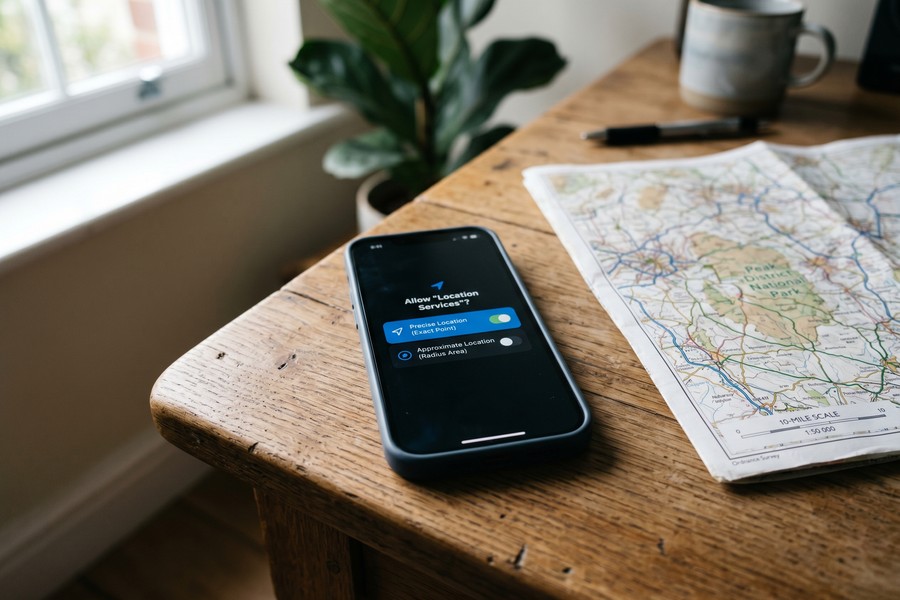
iOS and Android both now offer the option to grant approximate location (roughly a 10-mile radius) instead of precise GPS coordinates. For the majority of wellness apps that claim to need location, a fitness app adjusting for altitude, a hydration reminder using timezone, approximate location is entirely sufficient. Reserve precise location for apps where GPS accuracy is a genuine functional requirement, such as a run-mapping or cycling app. Even then, “While Using” access is the right default. “Always” access should be a deliberate exception, not the path of least resistance at install.
75% of the top 100 free apps in the US Apple App Store collect data to track users across other apps and websites, according to the 2025 App Privacy Index. For free wellness apps specifically, cross-app tracking is frequently how the business model functions: the app is free because your behavioral data is the product.
| Permission | Risk Level (Wellness Context) | Legitimate Use Case | Red Flag If Requested By |
|---|---|---|---|
| Precise location (Always) | Critical | Run/cycling route mapping | Meditation, nutrition, mood apps |
| Health data (read/write) | Critical | Fitness tracking, clinical apps | Recipe apps, general utilities |
| Microphone | High | Voice journaling, coaching apps | Sleep trackers, calorie counters |
| Camera | High | Food photo logging | Step counters, timer apps |
| Contacts | Medium-High | Social fitness challenges | Symptom trackers, sleep apps |
| Calendar | Medium-High | Appointment reminders | Calorie counters, breathing apps |
What to Do After the Audit: Revoke, Delete, and Request Data Removal
Revoking a permission stops future data collection from that category. It does not delete the data already collected and transmitted to the app’s servers or its third-party partners. Most audit guides stop at the toggle, which is why the next step, actively requesting data deletion, gets overlooked by the majority of users.
Data Deletion: Your Legal Rights
If you are a California resident, CCPA/CPRA gives you the right to request deletion of your personal data from any business that collected it. Washington’s My Health My Data Act, in force, extends specific deletion rights to health data collected by apps that operate outside HIPAA. Several other states have passed or are passing similar consumer data rights. Practically, this means visiting the app’s privacy policy page (usually found in Settings → [App] → Privacy Policy or the app’s website), locating the “data deletion request” or “right to be forgotten” form, and submitting a request. Some apps, particularly those with large user bases, have a dedicated privacy request portal.
One honest limitation worth naming: deletion requests are not uniformly honored. Outside California, Washington, and a handful of other states with enforceable consumer data rights, compliance is largely voluntary. An app operated by a small foreign developer may acknowledge your request and do nothing. Even domestically, enforcement is slow, and the FTC’s resources for pursuing individual complaints are limited. Deletion rights are real and worth exercising, but they work best as one part of a broader strategy, not as a complete remedy after the fact.
Deleting the app itself is also not enough. On iOS, deleting an app removes it and its local data from your device, but data already synced to the developer’s servers remains. Inside Apple Health specifically: going to Settings → Health → Apps and revoking a third-party app’s access stops it from reading or writing new data, but it does not delete the data that app already ingested from your Health records. Deleting the Health app itself on iOS does not delete the underlying health data stored by Apple; that requires going to Settings → Health → Browse → specific data type → Delete All Data.
Understanding the gap between revoking access and deleting stored data is also relevant if you have ever encountered a data breach from a wellness app. The FTC’s Health Breach Notification Rule now gives you a federal reporting channel if an app covered by the rule fails to notify you of unauthorized disclosure, another concrete reason to document what permissions you granted and when.
Keep a simple note (in a password-protected app or a physical notebook) recording which wellness apps you have used, the date you installed them, and any data deletion requests you submitted. If a breach notification arrives months later, that record tells you exactly what data was at risk and when.
Setting a Sustainable Audit Cadence
Quarterly is the recommended minimum. A full audit takes 15 to 30 minutes; a lighter check, just the App Privacy Report on iOS or the Privacy Dashboard on Android, takes five. Beyond the quarterly schedule, set an immediate review trigger for three specific events: any app update that requests new permissions, any news about an app being acquired or merging with another company, and any new permission prompt from an app you already have installed. That last one is the most actionable: if a period tracker suddenly asks for microphone access after an update, that is an explicit signal that something in the app’s functionality or business model has changed.
Building a Personal Privacy Standard for Every New Wellness App You Download
The goal is not zero permissions. Some permissions are genuinely necessary. A run-tracking app does need location access, and revoking it will break the core feature you downloaded the app for. Denying a food-logging app camera access when you use the photo-scanning feature makes the app useless for your purpose. The defensible position is informed minimum access: grant only what a specific feature requires, review it at regular intervals, and do not let onboarding momentum carry you into granting everything a prompt requests.
A Four-Question Pre-Install Checklist
Before downloading any new wellness app, work through four questions. First: does this app need to exist on my phone, or does a browser-based version serve the same purpose without requiring any device permissions at all? Second: what permissions does it request at install, and do they match what the core feature actually needs? Third: does the privacy policy explicitly state the app does not sell or share health data with third parties? Fourth: has this app been acquired or merged in the past two years? A quick search handles the last question in under two minutes, and the answer will sometimes change your decision.
Keeping Wellness Data Siloed
Using Apple Health or Google Fit as a single aggregator, rather than allowing every individual app to build its own data silo, limits how widely your health data can spread. Grant read or write access to that central repository only for apps with a clear fitness or clinical purpose. This approach means your step count, sleep data, and heart rate metrics are centrally stored and centrally audited, rather than scattered across a dozen independent servers with twelve different privacy policies. It also simplifies the audit process significantly: the Settings → Health → Apps screen becomes your single source of truth for which apps have access to the richest health data on your device. For those also thinking about broader data security on their devices, understanding what spyware looks like on a phone and how it gets removed is a worthwhile companion to this kind of permissions review.
Some wellness apps offer a “browser version” or progressive web app that requires no device permissions at all. For users who primarily need a feature like habit tracking or calorie logging without GPS or microphone input, the browser route eliminates the permissions problem entirely.
Keeping the Audit Habit: Schedules, Triggers, and Tools
Auditing once and never returning is only marginally better than never auditing at all. The permission landscape on a device shifts with every app update, every new install, and every policy change you did not read. The practical challenge is fitting a recurring audit into a life that already has too many maintenance tasks competing for attention.
One approach that works well is pairing the audit with an existing quarterly routine, the same week you review subscriptions, change passwords, or update your phone’s operating system. Scheduling it alongside a task you already do regularly removes the friction of remembering it separately. The iOS App Privacy Report and Android Privacy Dashboard both provide enough signal in a five-minute scan to determine whether a deeper audit is warranted, making the lightweight version genuinely low-cost. For users building out a full digital security practice, the framework for maintaining a personal security routine covers how to structure these recurring checks so they do not get dropped after the first month. Given how frequently social engineering tactics exploit the apps and permissions users have already granted, understanding how social engineering works adds useful context to why the permissions on your device matter beyond just data brokerage.
| Audit Trigger | Recommended Action | Time Required |
|---|---|---|
| Quarterly schedule | Full category-by-category review + Health app ecosystem check | 15–30 minutes |
| App update with new permission request | Immediate review of that app’s permissions + policy changes | 5–10 minutes |
| App acquisition news | Review permissions, check new privacy policy, consider deletion + data request | 10–15 minutes |
| New app install | Pre-install checklist + privacy label review | 5 minutes |
| Data breach notification | Revoke permissions, submit deletion request, document timeline | 20–30 minutes |
Real-World Example: A Wellness App Audit That Surfaced Three Unexpected Risks
Consider an illustrative example: a user with 23 health and wellness apps installed on an iPhone, a mix of fitness tracking, nutrition logging, sleep monitoring, period tracking, and two mental health journaling apps. Before the audit, they had not reviewed permissions since originally installing most of the apps, some over two years prior.
The audit began with Settings → Privacy & Security → Location Services. Of the 23 apps, 7 had location access. Three of those 7 were set to “Always”, including a meditation app, a nutrition log, and a period tracker. None of those three had a feature that required background location. Downgrading all three to “While Using” took under three minutes. Next, the App Privacy Report (enabled and reviewed after 48 hours) showed the nutrition app contacting 11 external domains during a 24-hour period, despite the user not opening it once. Six of those domains were identifiable ad-tech and analytics services.
The third finding came from Settings → Health → Apps: a fitness challenge app the user had deleted from their home screen two years earlier still had full read/write access to Apple Health data, steps, heart rate, active energy, and sleep analysis. The app had been acquired by a different company 14 months prior, a fact confirmed with a 90-second search. The user submitted a data deletion request via the new parent company’s privacy portal and revoked Health access. Without the hidden-layer audit step, this exposure would have remained entirely invisible.
Net result: 4 permissions revoked, 1 data deletion request submitted, and 2 apps deleted entirely after reviewing their updated privacy policies post-acquisition. The process took 38 minutes total, including the 48-hour window to let the App Privacy Report accumulate data. Before the audit, the user had no reason to believe anything unusual was happening. After it, they had documented evidence of background activity they had not consented to knowingly.
Your Action Plan
-
Enable the App Privacy Report (iOS) or check the Privacy Dashboard (Android) right now
On iPhone: Settings → Privacy & Security → App Privacy Report → Turn On App Privacy Report. On Android: Settings → Privacy → Privacy Dashboard. Let the report run for 48 hours before reviewing, so you have real behavioral data rather than a snapshot. This step alone will surface apps contacting ad-tech domains or accessing sensors you did not expect.
-
Audit location permissions first, they carry the highest risk
Go to Location Services (iOS) or Permission Manager → Location (Android) and downgrade every wellness app set to “Always” to “While Using” unless you can name a specific active-use feature that requires background location. Simultaneously, switch any app with “Precise” location to “Approximate” if GPS accuracy is not a core functional requirement. This single step meaningfully reduces background data collection.
-
Review the Health app ecosystem as a separate audit step
On iOS: Settings → Health → Apps. On Android: Google Fit → Profile → Settings → Connected apps. Revoke access for any app you no longer actively use, any app you deleted from your home screen but did not fully uninstall, and any app whose ownership has changed since you granted access. This layer is invisible in the standard privacy settings and is where the most sensitive data exposure often lives.
-
Work through each remaining permission category methodically
After location and health, move through Microphone, Camera, Contacts, and Calendar. For each app with access, apply the one-question filter: does this specific feature require this specific data? Revoke anything that does not pass. Document any app that had access you cannot explain, that is worth investigating further.
-
Check the ownership history of your top five most-used wellness apps
Search “[app name] acquired” or “[app name] parent company” for any app handling your health, location, or mood data. If an app has changed ownership since you installed it and you have not read the updated privacy policy, do so now. If the new policy permits sharing with “advertising partners” or “affiliated companies” in ways the original did not, weigh whether to continue using the app.
-
Submit data deletion requests for apps you have stopped using
Deleting the app stops future collection, but existing data remains on the developer’s servers. For apps handling health, location, or reproductive data, locate the privacy policy’s data deletion section (or search “[app name] data deletion request”) and submit a formal request. California residents have CCPA/CPRA rights; Washington residents have rights under the My Health My Data Act; others should check their state’s current consumer data laws, which have expanded significantly since 2023.
-
Apply the four-question checklist to every future wellness app install
Before downloading, ask: (1) Can a browser version replace this? (2) Do the permissions it requests match what the core feature needs? (3) Does its privacy policy explicitly prohibit selling health data? (4) Has it been acquired in the past two years? This pre-install screen takes five minutes and prevents the problem from recurring. Making it a habit converts a one-time audit into an ongoing standard.
-
Schedule a quarterly audit and set three event-based triggers
Block 30 minutes on your calendar once per quarter for a full review. Set personal rules to trigger an immediate check for three events: any app update that requests new permissions, any news of an acquisition affecting an app you use, and any new in-app permission prompt. Pairing the quarterly audit with a task you already perform regularly, subscription review, password update, gives it a reliable anchor so it does not slip.
Frequently Asked Questions
Does deleting an app remove all the data it collected?
No. Deleting an app removes it and its locally stored data from your device, but it does not delete data already transmitted to the developer’s servers or shared with third-party SDKs. To remove that data, you need to submit a formal deletion request through the app’s privacy policy page. California, Washington, and several other states have laws that make this request legally enforceable for residents; outside those jurisdictions, compliance is generally at the developer’s discretion.
Is a free wellness app riskier than a paid one from a privacy standpoint?
Generally, yes, though not universally. Free apps frequently rely on advertising revenue, which creates a structural incentive to collect and share user data with ad-tech partners. The 2025 App Privacy Index found that 75% of the top 100 free US App Store apps collect cross-app tracking data for advertising. Paid apps can still share data, but the business model is less directly tied to data monetization. Reading the privacy label before installing tells you more than the price tag alone.
Can I trust Apple’s App Privacy nutrition labels and Google Play’s Data Safety section?
They are useful but imperfect. Both systems rely on developer self-reporting, and the NowSecure research from August 2025 found that 35% of iOS apps tested failed to accurately disclose their data collection. Apple’s rejection of 12% of Q1 2025 submissions for Privacy Manifest violations shows the review process is improving, but significant gaps remain. Treat the labels as a first-pass screen, not a guarantee, and use the App Privacy Report or Privacy Dashboard to verify actual behavior after install.
What is the App Privacy Report and how do I use it?
The App Privacy Report is a built-in iOS feature (Settings → Privacy & Security → App Privacy Report) that logs which apps accessed your microphone, camera, location, contacts, and media library over the past seven days, along with which external domains each app contacted. Enable it, wait 48 hours for meaningful data to accumulate, then review the list. Any app contacting a high volume of advertising or analytics domains while you have not actively used it is a flag worth acting on.
Are health and wellness apps covered by HIPAA?
Most are not. HIPAA applies to covered entities (healthcare providers, insurers, clearinghouses) and their business associates. The vast majority of consumer wellness apps, period trackers, nutrition logs, sleep monitors, mental health chatbots, AI therapy tools, are none of those things. They are regulated primarily by their own privacy policies and, where applicable, by the FTC Act and state consumer protection laws. The FTC’s amended Health Breach Notification Rule (effective July 29, 2024) now requires certain health apps to notify users of unauthorized data disclosures, but that is breach notification, not the full data-protection framework that HIPAA provides.
How often should I run a permissions audit?
Quarterly is the recommended baseline for a full review. In practice, three specific events should trigger an immediate check between scheduled audits: an app update that includes a new permission request, news that an app you use has been acquired or merged, and any in-app prompt requesting a permission the app did not previously ask for. These event triggers catch the changes that quarterly scheduling would otherwise miss for three months.
What should I do if I find an app that has been secretly accessing my microphone or camera?
Revoke the permission immediately from Settings → Privacy & Security → Microphone or Camera (iOS) or Permission Manager (Android). If the access appears to have been ongoing and you did not grant it intentionally, review the app’s privacy policy to understand what data it claims to collect and submit a data deletion request. If the app is a wellness or health app and you believe data was shared without your knowledge or authorization, the FTC’s Health Breach Notification Rule may be relevant; you can report suspected violations to the FTC at ftc.gov. Consider whether the app should remain on your device at all.
Is it safe to use wellness apps at all, given these risks?
Yes, with deliberate choices. The risks outlined here are real, but so are the benefits that well-designed wellness apps provide. The goal of an audit is not to eliminate all apps but to match the access you grant to the specific value you receive. An app that genuinely improves your sleep, helps you manage a health condition, or supports your mental health is worth using, with the minimum permissions it needs to deliver that value, reviewed at regular intervals. Informed minimum access, not zero access, is the right standard.
Sources
- NowSecure, New NowSecure Research Targets Mobile App Privacy Risks: What You Don’t See Is Hurting You (2025)
- Tenscope, 2025 App Privacy Index
- GoodFirms, Why Apps Ask for Permissions: Know Data Control (2025)
- Federal Trade Commission, FTC Finalizes Changes to Health Breach Notification Rule (2024)
- California Attorney General, California Consumer Privacy Act (CCPA)
- Washington State Legislature, My Health My Data Act (RCW 19.373)
- Apple Support, About App Privacy Report
- Pew Research Center, Americans and Privacy: Concerned, Confused and Feeling Lack of Control
- FTC Consumer Advice, How to Protect Your Privacy on Apps






