
Fact-checked by the SnapMessages editorial team
A 2025 survey by Wellingtone found that 46% of organizations are dissatisfied with their project management maturity, and 11% have no formal PM solution at all, yet the majority of teams that do use these tools are still missing deadlines, drowning in notifications, and ending the workday feeling somehow busier than when they started. The pattern behind those numbers is not a software problem. It is a collection of deeply ingrained project management apps mistakes that turn capable tools into anxiety machines.
The cost is not abstract. Wrike’s 2024 research found that knowledge workers waste an average of 13.7 hours per week due to unstructured work, poor visibility, and absent tracking, roughly $16,500 per knowledge worker per year. The Project Management Institute estimates that $75 million out of every $1 billion spent on projects is at risk from ineffective communications alone. Only 47% of projects are handled by a trained project manager, meaning the people who use these apps most are often the least equipped to configure them well.
This guide breaks down the five specific ways most people misuse project management apps at work, and explains not just what to stop doing, but why these habits form, what they cost cognitively and organizationally, and how to restructure your setup so the tool actually supports the way human brains work.
Key Takeaways
- 46% of organizations are dissatisfied with their PM maturity, and 14% still plan projects using only Microsoft Excel, as of Wellingtone’s 2025 report.
- Poor PM tool habits cost roughly $16,500 per knowledge worker annually, according to Wrike’s 2024 Impactful Work Report.
- $75 million out of every $1 billion in project spending is at risk from communication failures alone (PMI estimate).
- Context switching between apps costs the equivalent of roughly five full working weeks per year per worker, with 43% describing it as “mentally exhausting.”
- 64% of project managers report feeling stressed or overworked, yet most PM dashboards surface zero wellbeing data until performance has already dropped.
- 71% of companies believe employees need more project management skills, pointing to a competency gap that no app feature set can fix on its own.
In This Guide
- Why the App Itself Is Not the Problem
- Mistake 1: Turning Every Task Into a Tracked Item
- Mistake 2: Using Notifications as a Productivity System
- Mistake 3: Running Too Many Tools at Once
- Mistake 4: Measuring Busyness Instead of Actual Progress
- Mistake 5: Ignoring the Human Layer the App Cannot See
- The Five Mistakes Side by Side
- What a Healthier Relationship With Your App Looks Like
- The Neurodivergent Worker and the Notification Problem
- Capacity Planning as a Wellness Issue, Not Just Scheduling
Why the App Itself Is Not the Problem
Most teams adopt a project management app during a crisis: a missed deadline, a dropped handoff, a manager who finally decided that email threads are not a project plan. The impulse is reasonable. The assumption behind it is not. The assumption is that the app will fix the underlying chaos.
Apps are neutral infrastructure. They amplify whatever system, or lack of system, already exists. A team with vague goals and unclear ownership will replicate that vagueness inside Asana or Monday.com just as faithfully as they replicated it in a shared spreadsheet. The tool records the dysfunction; it does not diagnose or resolve it.
Wellingtone’s 2025 annual survey of hundreds of PM practitioners found that 14% of organizations still plan projects using only Microsoft Excel, and 11% have no PM solution at all. Those numbers point less to a shortage of good software than to a persistent gap in how organizations think about the work of managing work. Tools like Asana, Monday.com, Linear, and Jira have real, documented benefits when configured well. Breaking large projects into discrete tasks gives workers a sense of control over their workload, and that sense of control is one of the most consistently protective factors against deadline anxiety. Perceived control over one’s work is linked to lower cortisol levels and better recovery outside working hours. The goal here is not to abandon the tools. It is to stop using them in ways that erase those benefits entirely.
In more than 60% of companies, projects never achieve full or even partial success. Stress and burnout are documented contributing factors, meaning misconfigured PM habits carry real organizational health costs, not just productivity ones.
The Real Culprit: Behavior, Not Features
Every app misuse pattern described in this article comes down to a behavioral habit, usually one that predates the app. Over-notification is a symptom of a team culture that rewards fast responses. Over-logging tasks is a symptom of a perfectionism loop. Tool sprawl happens because procurement decisions prioritize price and feature lists over actual workflow fit. The apps do not create these habits; they give them a new surface to run on.
That framing matters because it changes where you intervene. You do not need a new app. You need to audit the behaviors you have brought into the one you already have.
Mistake 1: Turning Every Task Into a Tracked Item
Ask any power user of a project management tool what their board looks like, and a reliable answer emerges: hundreds of tasks, many of them trivial, most of them carrying the same visual weight as the ones that actually matter. “Reply to vendor” sits next to “finalize Q3 budget presentation.” Both have due dates. Both generate notifications. Neither knows the difference.
The cognitive cost of this is specific and measurable. Each open task in your system registers in working memory as an unresolved loop, what psychologists call a Zeigarnik effect variant. Your brain keeps a background process running for every incomplete item it knows about, which means a board with 200 open tasks is running 200 background processes. That is not productivity; it is a sustained low-level alert state that compounds across the day.
Decision Fatigue and the Perfectionism Trap
Project managers already show a documented tendency toward perfectionism and cognitive overload. Logging everything accelerates that drain. Every time you open the app and scan the list, you are making micro-decisions: Is this still relevant? Should I reschedule it? Is it blocking anything? Multiply that by 200 tasks and then by five days a week, and you have created a decision fatigue engine wrapped in a productivity interface.
The fix is not complicated, but it requires a deliberate rule. Separate trackable work, tasks that have a deliverable, a deadline, or a dependency, from ambient work, which is the routine professional maintenance that does not need to live in a system at all. A good heuristic: if you would not put it on a team status update, it probably does not belong in the shared task board either.
71% of companies believe employees need more project management skills. A large part of that gap is not knowing what not to track, not knowing how to use the tool, but knowing when not to.
One more honest note: the urge to log everything often comes from a good place. People want to feel accountable, visible, and thorough. Those are not bad instincts. The problem is that an app built for team coordination is not a personal to-do list, and conflating the two erodes the signal quality of the system for everyone who shares it.
There is also a real limitation worth naming here. Reducing task noise helps individuals, but it does not fix organizations where managers demand granular visibility into every hour of work. Some team cultures are so deeply oriented toward tracking as a control mechanism that a cleaner board will be seen as a sign of low effort. Addressing that dynamic requires a conversation about management philosophy, not just a reconfiguration of Asana or Jira. The app change is the easy part; the culture change is not.
Mistake 2: Using Notifications as a Productivity System
Default notification settings in project management apps are configured for engagement, not for human cognition. Every comment, status change, mention, and due-date reminder fires in real time because that is what keeps users inside the app. That design logic is reasonable from a product standpoint. From a neurological standpoint, it is a problem.
After only 20 minutes of repeated interruptions, people report significantly higher stress and frustration. Knowledge workers switch between apps roughly 1,200 times per day, and each switch costs somewhere between 20% and 40% of productive time, time spent not on the new task, but on re-orienting to it. The cumulative effect across a week is the equivalent of losing one full working day to context-switching overhead alone.
Information Fear of Missing Out (IFoMO) Is a Documented Health Risk
A 2024 peer-reviewed study (Marsh et al., Sage Journals) identified Information Fear of Missing Out (IFoMO) as an independent risk factor for employee mental health. Combined with information overload, IFoMO predicts greater exhaustion at work, not just lower productivity, but measurable fatigue and anxiety. This is the same psychological mechanism that real-time notifications activate: the persistent low-level fear that something important happened and you missed it.
This is worth naming directly, because most discussions of notification overload treat it as a time-management problem. It is also a health problem, and for some workers, particularly those with anxiety-adjacent tendencies, the gap between “I should check this” and “I cannot stop checking this” is narrower than any app designer accounts for.
Set a batch-check protocol: review project management app notifications at three fixed times per day (morning, post-lunch, end of day). Turn off all real-time push notifications for the app outside those windows. Most teams adapt within two weeks, and response times rarely suffer in practice.
Relying on the app for urgent communications is a separate structural problem, one worth solving with a clear escalation path (a direct message or phone call for genuine urgency) rather than by keeping the entire notification system on maximum sensitivity for everything.
Wrike’s 2024 Impactful Work Report found that unstructured work and lack of project visibility cost organizations roughly $16,500 per knowledge worker annually. Much of that loss traces directly to the interruption tax that default notification settings impose, not to any shortage of hours in the day.
For teams already thinking about how communication tools intersect with mental load, the article on why teams are switching to asynchronous messaging covers the same tension from a different angle and is worth reading alongside this one.
Mistake 3: Running Too Many Tools at Once
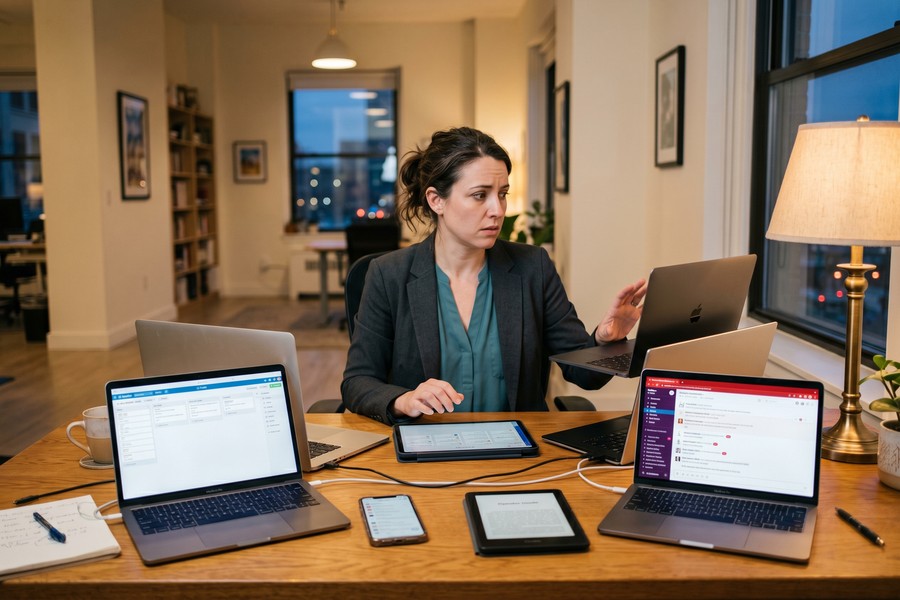
The average knowledge worker in 2024 uses more than nine different apps to complete their daily work. Project management platforms, chat tools, document editors, spreadsheets, email, video calls, time trackers, each one adopted for a specific reason, and each one adding another surface where work can hide. Platforms like Slack, Google Workspace, Notion, and Jira each solve a real problem, but stacked together without a clear hierarchy, they create as many problems as they solve.
Workers spend roughly 1.8 hours daily searching for information scattered across multiple tools. That is 9 hours per week, or the equivalent of five full working weeks per year, lost to the friction of a fragmented system. The 43% of workers who describe constant tool-switching as “mentally exhausting” are not being dramatic. The exhaustion is structural.
Why Tool Sprawl Happens
Tool adoption decisions are rarely made by the people doing the work. A department head sees a demo, a procurement team compares pricing, and within weeks a new app is added to the stack without removing anything. Ease of use and fit for actual workflows are almost never evaluated before purchase. The result is not a curated system; it is sediment.
Consolidating tools, genuinely consolidating, not just renaming the tab, produces measurably less stress and better focus. That outcome is not surprising once you account for how much cognitive energy goes into maintaining a mental map of “where did we put that?” across nine platforms.
Adding a new project management app without retiring the old one is one of the most common and costly mistakes. Each additional tool increases search time, creates version-control gaps, and adds another notification source, compounding the stress load rather than reducing it.
The IFoMO Connection
Multi-tool environments intensify IFoMO. When work is spread across five platforms, the fear of missing something important is structurally reasonable, because things genuinely do get missed. The anxiety is not irrational; it is a rational response to a poorly designed information environment. Fixing the environment is the intervention, not managing the anxiety on top of it.
Mistake 4: Measuring Busyness Instead of Actual Progress
Project management dashboards are very good at showing how much is happening. Tasks completed, hours logged, comments posted, tickets closed. These metrics feel meaningful. Most of the time, they measure activity rather than progress, and that distinction carries real consequences for team health.
When the primary output visible in the app is volume (how many tasks were checked off), the team optimizes for volume. The result is a busyness badge culture where overloaded boards become signals of effort, and a short task list reads as underperformance rather than efficiency. That culture feeds anxiety in both directions: people pad their task lists to look busy, and managers over-assign to ensure the board stays full.
Capacity Is a Wellness Issue
Human brains sustain roughly four to five hours of genuine deep focus per day. That is not a productivity opinion; it is grounded in cognitive science research on attentional resources and mental fatigue. Apps configured to fill every available hour from 9 to 5 are building structural burnout into the schedule, not by accident but by design default.
Build capacity buffers into the tool intentionally. If a sprint contains 40 hours of tasks for a 40-hour week, there is no margin for interruptions, rework, or the ordinary friction of work. Planning to 70–75% of theoretical capacity is not pessimism; it is accuracy. Teams that do this consistently report fewer end-of-sprint crises and lower self-reported stress.
Knowledge workers waste an average of 13.7 hours per week due to unstructured work and lack of progress visibility, costing organizations roughly $16,500 per knowledge worker per year (Wrike, 2024).
The metric worth tracking instead of task volume: what got done during peak focus hours, and whether it moved a defined goal forward. Some teams call this energy-aligned output. The label matters less than the habit of asking whether completed tasks were the right tasks, not just many tasks.
Mistake 5: Ignoring the Human Layer the App Cannot See
Project management apps track tasks. They do not track people. That asymmetry is not a design failure; it is just the honest scope of what these tools do. The problem is when teams treat the absence of a red flag in the dashboard as confirmation that everything is fine.
According to Wellingtone’s 2025 survey data, 64% of project managers report feeling stressed or overworked. Most PM dashboards surface none of that signal until performance has visibly degraded, meaning the tool shows the outcome of burnout (missed deadlines, dropped tasks) but not the condition that caused it. By the time the dashboard reflects the problem, it is weeks old.
Role Ambiguity and the Limits of Organized Work
An app organizes work that has already been defined. It cannot substitute for the human conversations that define it. Role ambiguity and unclear goals are two of the most consistently documented sources of occupational stress, and no task board resolves them. If two people are responsible for a deliverable and neither knows how authority is divided, that tension will show up as passive communication patterns, duplicated work, and eventual friction, none of which the app can detect.
The underused opportunity in most project management platforms is the comment and check-in feature. Most teams use these purely for status updates (“done,” “in review,” “blocked”). Used with slight intentionality, they become a lightweight wellbeing pulse. A weekly check-in prompt asking “what’s one thing slowing you down that isn’t visible in the board?” costs nothing and surfaces exactly the kind of information the task view cannot.
Burned-out project managers are 63% more likely to take a sick day, and the productivity loss associated with burnout costs organizations roughly 34% of that employee’s annual salary. The financial case for tracking team health is as strong as the human one.
The Five Mistakes Side by Side
Seeing these patterns in a single view makes it easier to diagnose which one is most active in your team’s current setup. The table below maps each mistake to its primary cost and the simplest corrective action.
| Mistake | Primary Cost | Simplest Fix |
|---|---|---|
| Over-logging tasks | Decision fatigue, background cognitive load | Track only deliverable-bearing tasks; remove ambient work items |
| Real-time notifications | IFoMO, chronic interruption, stress accumulation | Batch-check at 3 fixed times; disable push alerts outside those windows |
| Tool sprawl | 1.8 hours/day lost to information search; mental exhaustion | Audit tools quarterly; retire any that duplicate an existing function |
| Measuring busyness | Activity theater; structural burnout via over-capacity planning | Plan to 70–75% capacity; track goal-aligned output, not task volume |
| Ignoring the human layer | Burnout invisible until performance drops; 34% salary productivity loss | Add a weekly qualitative check-in prompt to the board routine |
Most teams exhibit at least three of these simultaneously. The overlap is not coincidental: over-logging feeds real-time notification load, which multiplies across multiple tools, all of which measure activity rather than health. They reinforce each other, which is why addressing one in isolation often produces limited results.
What a Healthier Relationship With Your App Looks Like
The reframe is not dramatic. Fewer tracked tasks, batched notifications, one consolidated tool environment, capacity buffers built into scheduling by default, and a weekly team pulse that looks at how people are doing, not just what was delivered.
A practical benchmark: a board with more than 20 active tasks per person at any given time has likely lost enough signal quality to be counterproductive. Everything looks equally urgent when there is too much to distinguish. At that point, the board is generating anxiety more reliably than it is organizing work.
Separately, check the first thing your team does on Monday morning. If it is scanning notifications from the weekend, the notification architecture needs adjustment. And if a new tool was added to the stack in the last six months without retiring an older one, that decision deserves a second look.
The Honest Concession
No configuration change fixes a toxic workload. Organizational culture and realistic planning matter more than any feature set. The app is a mirror: it reflects what the organization actually values, how it actually communicates, and how work is actually assigned. If leadership rewards overcommitment and treats capacity buffers as laziness, a better-configured Asana board will not change that dynamic.
What a well-configured app can do is make the dysfunction visible faster and create enough structural relief that individual contributors have some cognitive margin to push back on unreasonable expectations. That is a meaningful, if limited, benefit, and it is worth being specific about what the tool can and cannot do.
Broader questions about how communication tools affect daily workload and attention are worth exploring in context. The comparison of Zoom versus Google Meet for video calls raises some of the same configuration questions in a different tool context. And for building more focused work blocks around app use, the best Pomodoro timer apps for deep work offer a complementary approach worth layering in.
The Neurodivergent Worker and the Notification Problem
This angle is almost entirely absent from the standard project management advice literature, and it is a genuine gap. For neurodivergent workers, those with ADHD, autism spectrum conditions, anxiety disorders, or sensory processing differences, the default notification settings in project management apps are not mildly annoying. They can be acutely disruptive.
The tension is real: workers who silence notifications to protect their focus are then penalized by team culture norms that expect fast response times. The app’s architecture assumes that everyone has the same capacity to filter relevant pings from irrelevant ones and return smoothly to deep work. That assumption is wrong for a significant portion of the workforce, and designing notification protocols that accommodate different response time needs is both a wellness and an equity issue.
Research on IFoMO (Information Fear of Missing Out) found it predicts greater exhaustion independently of workload. For neurodivergent workers already managing sensory or attentional differences, this exhaustion arrives faster and with less obvious warning.
Capacity Planning as a Wellness Issue, Not Just Scheduling
Most project management articles treat capacity planning as a resource allocation exercise. That framing is incomplete. When a system is consistently planned to 100% of theoretical capacity, the people inside that system have no margin for recovery, rework, or the inevitable friction of collaborative work. That is not a scheduling inefficiency. It is a burnout mechanism.
The cognitive science basis for this is specific: the human brain sustains roughly four to five hours of genuine focused work per day, not eight. Scheduling eight hours of concentrated tasks is not ambitious; it is structurally unsound. Apps like Monday.com and Asana make over-planning easy because they display available time in clean blocks, and filling those blocks feels like responsible planning. The app does not know the difference between scheduled time and sustainable time.
| Planning Approach | Theoretical Output | Realistic Output | Burnout Risk |
|---|---|---|---|
| 100% capacity | 40 hrs/week of tasks | 25–28 hrs completed | High, no buffer for friction or recovery |
| 75% capacity | 30 hrs/week of tasks | 28–30 hrs completed | Low, margin absorbs interruptions |
| 60% capacity | 24 hrs/week of tasks | 24 hrs completed | Very low, but may signal underutilization if sustained |
Teams that build explicit capacity buffers into their setup consistently report lower end-of-sprint stress. The 30-hour week is not the goal; the goal is planning honestly rather than optimistically. An app configured to 75% capacity does not reduce output, it reduces the gap between what was planned and what was actually possible, which is the gap where most team stress lives.
Understanding how automation and shortcut tools can reduce manual task overhead is another lever worth pulling. Automating repetitive iPhone tasks with Shortcuts is one concrete way to free up the kind of low-value time that otherwise eats into deep work capacity.

| Behavior | Cognitive Effect | Organizational Cost |
|---|---|---|
| Logging 200+ tasks | 200 open cognitive loops running simultaneously | Decision fatigue, slower response quality |
| Real-time notifications | 1,200 app switches/day, 20–40% productive time lost per switch | ~5 working weeks/year lost per worker |
| Using 9+ tools | 1.8 hrs/day searching for scattered information | 9 hrs/week per person in information friction |
| 100% capacity planning | No buffer for rework, interruptions, or recovery | Structural burnout; 34% salary loss in productivity |
| Dashboard-only wellbeing check | Stress invisible until performance drops | 63% higher sick-day rate for burned-out PMs |
Knowledge workers waste an average of 13.7 hours per week due to unstructured work, poor visibility into project progress, and lack of tracking — costing organizations roughly $16,500 per knowledge worker annually,
says Wrike, 2024 Impactful Work Report.
Real-World Example: A Mid-Size Marketing Team Restructures Its PM Setup
Consider an illustrative example: a marketing team of 12 people at a mid-size software company, running all their work through a popular project management platform. Their shared board has 340 active tasks, all team members have real-time notifications enabled, and the company uses five separate tools, the PM app, a chat platform, a document editor, a shared spreadsheet for budgets, and email. Each team member receives an average of 85 app notifications per day. End-of-quarter surveys show 8 of 12 team members reporting high stress levels, and the team misses roughly 30% of internal deadlines.
Over two months, they make four changes: they reduce the active task board to deliverable-bearing items only (board drops from 340 to 74 tasks), switch to batch notifications at 9 a.m., 1 p.m., and 4:30 p.m., retire the standalone budget spreadsheet by integrating budget fields directly into the PM tool, and plan sprints to 75% of theoretical capacity instead of 100%. No new software is purchased.
At the next quarterly survey, 5 of the original 8 high-stress team members report moderate or low stress. Internal deadline adherence rises from 70% to 87%. The team estimates they recover roughly 6 hours per person per week from reduced context switching and notification interruption, which, at an average fully loaded cost of $55 per hour, represents approximately $330 per person per week, or around $205,920 annually for the team of 12.
The changes are not free of friction. Two senior team members push back on the batched notification protocol for the first three weeks, concerned about missing urgent requests. The resolution is establishing a clear escalation path: genuine urgencies go to a direct message channel, not the project board. Once that norm is established, the batch-check protocol holds. The case illustrates both the gains available and the cultural negotiation required, the app change is the easy part.
Your Action Plan
-
Audit your current task board for noise
Go through your active task list and apply one filter: does this task have a deliverable, a deadline, or a dependency that affects someone else? If not, remove it from the shared board. Move personal to-do items to a private list or a personal productivity tool. Most teams cut their board size by 40–60% in a single session, and the clarity improvement is immediate.
-
Reconfigure notifications to batch-check only
Turn off all real-time push notifications for your project management app. Set three fixed review windows per day and communicate those windows to your team. Create a written escalation protocol, one sentence, shared in your team channel, that defines what qualifies as urgent enough to warrant a direct message instead of a board comment. Give the new rhythm two full weeks before evaluating it; most teams adapt faster than they expect.
-
Map your current tool stack and identify redundancies
List every tool your team uses in a typical work week. For each one, write one sentence describing what it does that no other tool on the list does. Any tool that cannot pass that test is a candidate for retirement. If two tools serve the same function, consolidate to the one with better integration into your primary PM platform. Do not add a new tool to the stack without retiring an existing one.
-
Rebuild your next sprint or project plan at 75% capacity
Take the number of available working hours for your team in the next sprint and multiply by 0.75. That is your planning ceiling. Assign tasks up to that ceiling only. The remaining 25% is not unproductive time, it is the margin that absorbs rework, unplanned requests, and the ordinary friction of collaboration. Complete everything before the sprint ends, and you can pull in additional items. Not reaching the ceiling does not make the sprint a failure.
-
Introduce a weekly qualitative check-in prompt
Add a recurring item to your team’s weekly board routine: a check-in question that cannot be answered with a task status. Examples include “What’s one thing slowing you down that isn’t visible in the board?” or “What would make next week easier than this week?” Rotate who responds publicly and who responds privately to the project manager. The goal is to surface information that the task view structurally cannot show.
-
Separate goal metrics from activity metrics in your dashboard
Review what your PM dashboard currently measures. If the primary visible metrics are tasks completed and hours logged, add at least one goal-aligned metric: percentage of milestone targets met, number of deliverables shipped on time, or revenue-adjacent output tied to the project. Activity metrics are not wrong, but they should not be the only story the dashboard tells. When teams can see goal progress alongside task volume, the relationship between busyness and results becomes visible, and often clarifying.
-
Establish an explicit notification and response-time norm for neurodivergent team members
Make response-time expectations explicit and written rather than assumed, for everyone, not only those who have disclosed a neurodivergent condition. A norm like “comments on project boards receive a response within four business hours” protects workers who need to batch-check without penalizing them for not responding in real time. This is a policy question as much as a configuration question, and it belongs in the team working agreement, not just the app settings.
Frequently Asked Questions
Are project management apps actually worth using, or do they create more overhead than they solve?
For teams with more than three or four people working on interconnected tasks, a shared project management system is genuinely useful. The overhead problem is almost always a configuration and behavior issue, not an inherent flaw in the tool category. A well-configured app reduces the mental load of tracking who is doing what and when, which is real cognitive relief. Use it for coordination, not as a substitute for good planning or clear communication.
How many tasks is too many for a shared board?
There is no universal number, but a useful working rule is 15–20 active tasks per person at any given time. Beyond that, the board loses signal quality, everything looks equally urgent because there is too much to distinguish. Teams that regularly exceed this threshold should audit whether all tracked items genuinely need to be in the shared system, or whether some belong in a personal list.
Do real-time notifications actually affect mental health, or is that overstated?
The evidence is real. A 2024 peer-reviewed study by Marsh et al. (Sage Journals) identified Information Fear of Missing Out as an independent predictor of employee exhaustion, separate from workload itself. Research also shows that as few as 20 minutes of repeated interruptions is enough to significantly raise reported stress levels. The effect is not dramatic for everyone, but it is consistent across the literature, and for workers with anxiety or attention differences, it can be acute.
Is it realistic to plan to only 75% of capacity? Won’t that frustrate managers who want full utilization?
This is the most common pushback, and it is worth addressing honestly. Full utilization planning looks efficient on paper but consistently produces lower actual output because it leaves no margin for the inevitable: rework, unclear requirements, sick days, and unplanned requests. Teams that plan to 75% typically deliver more completed work per sprint than teams planning to 100%, because they are not constantly deferring overflow. The harder problem is cultural: some managers equate visible busyness with value, and changing that norm requires a conversation about outcomes, not just a configuration change in the app.
Which project management app is the best for avoiding these mistakes?
The tool matters less than the behavior. Apps that offer granular notification controls, the ability to mute specific project types while keeping others active, along with clear capacity visualization and integrated check-in features reduce the friction of implementing better habits. Among widely used options, Asana, Monday.com, Linear, and Jira all offer meaningful notification controls. What they cannot do is enforce a culture of realistic planning or qualitative check-ins; those require human decisions.
My team uses five different tools and nobody wants to give any of them up. How do I consolidate without a fight?
Start with data, not opinions. For one week, ask each team member to track how many minutes they spend daily searching for information across tools, and how many times they switch platforms to complete a single task. When the cost of tool sprawl is concrete and personal rather than abstract, the conversation about consolidation becomes less political. Then propose a trial: use only the primary PM platform for one category of work for two weeks and measure whether anything actually breaks.
Can project management app habits really contribute to burnout?
Yes, and the pathway is specific. Over-capacity planning builds structural fatigue into the schedule. Real-time notifications maintain a chronic low-level alert state. Over-logging tasks creates decision fatigue. Together, these habits produce the same physiological stress response as more obvious burnout drivers, just more gradually and less visibly. Wellingtone’s data on 64% of project managers feeling stressed or overworked is not coincidental; the way most teams configure their PM tools actively contributes to that figure.
What should a wellbeing check-in in a project management app actually look like?
It does not need to be elaborate. A recurring weekly prompt, added as a pinned comment, a check-in card, or a recurring task, with a single open question is enough. Questions like “What’s one thing making your work harder than it needs to be this week?” or “What would you change about how the team is working right now?” generate more useful signal than any status dashboard. The check-in should be voluntary and psychologically safe, meaning there are no consequences for honest answers, or it will produce performatively positive responses that are no more useful than no check-in at all.
How do I handle the tension between batching notifications and needing to respond quickly in a fast-moving team?
Define urgency explicitly before changing the notification protocol. Most teams, when pressed, can identify that genuine urgency, meaning something that cannot wait four hours, accounts for fewer than 5% of all messages sent through the project board. Everything else is expected to be fast because the culture has trained people to expect speed, not because the work actually requires it. Write down what qualifies as urgent, establish a direct-message or phone escalation path for those cases only, and then batch everything else. Most teams find the escalation path is used far less often than they predicted.
Are there resources specifically for neurodivergent workers trying to manage project management app overload?
Dedicated resources are sparse, but the general principles apply with higher stakes. The most important accommodations are written response-time norms (so silence does not read as disengagement), permission to batch-check without penalty, and reduced notification volume by default rather than as a special accommodation. Teams that build these norms universally benefit everyone, but they are essential rather than optional for neurodivergent workers who face real anxiety consequences from the always-on expectation. Building a personal digital hygiene routine that includes deliberate app use boundaries is a useful starting point for any worker managing digital overload.
If your team’s definition of “urgent” includes anything that arrives through the project board, the board itself has become an anxiety driver. Urgency and project management should occupy different channels, conflating them is how real-time notification dependence becomes structurally impossible to escape.
Sources
- Wellingtone, State of Project Management Report 2025
- Wrike, 2024 Impactful Work Report: What Are Project Management Tools?
- monday.com, Project Management Statistics 2024
- ProProfs Project, Project Management Statistics 2024
- American Psychological Association, Multitasking: Switching Costs and Cognitive Load
- Gallup, State of the Global Workplace: Employee Stress and Burnout Data






