Fact-checked by the SnapMessages editorial team
Quick Answer
The best lifestyle apps to simplify your daily routine in July 2025 include Todoist, Headspace, MyFitnessPal, Notion, and Google Calendar. These tools collectively help users save up to 2 hours per day on task management and planning. Over 85% of smartphone users rely on at least one productivity or wellness app daily to streamline their schedules.
Lifestyle apps daily routine tools have become essential for managing the complexity of modern schedules, with the global productivity app market valued at over $102 billion in 2024 according to Statista. From habit tracking to meal planning, the right app stack can eliminate friction and replace scattered paper systems with a single, unified workflow. Whether you are managing work deadlines, fitness goals, or sleep hygiene, there is a purpose-built app designed to handle it.
This guide covers the top lifestyle apps across six core daily categories — productivity, health, sleep, finance, mindfulness, and smart home integration. You will learn what each app does best, how they compare on key features, and which combination works for most people in 2025.
Key Takeaways
- The global productivity app market exceeded $102 billion in 2024, reflecting massive mainstream adoption (Statista, 2024).
- Users who track habits digitally are 42% more likely to achieve their goals than those who do not, according to American Psychological Association research on self-monitoring.
- MyFitnessPal has over 200 million registered users and a food database of more than 14 million items, making it the largest nutrition-tracking platform available (MyFitnessPal About page).
- Mindfulness apps like Headspace report that users who complete an 8-day beginner course show a measurable 14% reduction in stress, based on Headspace’s published clinical research.
- Smart home apps integrated with daily schedules can reduce household energy costs by up to 23% annually, according to the U.S. Department of Energy.
In This Guide
- What Are Lifestyle Apps and Why Do They Matter for Your Daily Routine?
- Which Productivity Apps Best Organize Your Daily Tasks?
- Which Health and Fitness Apps Fit Seamlessly Into Your Day?
- Which Mindfulness and Sleep Apps Actually Improve Your Wellbeing?
- Which Finance Apps Help You Manage Money Without the Stress?
- How Do Smart Home Apps Automate Your Daily Routine?
- How Do You Build the Right Lifestyle App Stack for Your Routine?
What Are Lifestyle Apps and Why Do They Matter for Your Daily Routine?
Lifestyle apps are mobile and desktop applications designed to help users manage health, productivity, finances, mindfulness, and home automation within their everyday schedules. They matter because fragmented routines — where tasks, habits, and goals live in separate systems — are a leading source of daily stress and inefficiency.
The average person switches between over 9 different apps per day according to RescueTime’s productivity research. Consolidating those touchpoints into a curated lifestyle app stack reduces decision fatigue and keeps your routine consistent.
The Case for Building a Routine Around Apps
Routine-building is backed by behavioral science. The habit loop — cue, routine, reward — is strengthened when digital reminders and tracking replace reliance on memory alone. Apps provide the cue and the reward feedback in a single interface.
Lifestyle apps daily routine tools also integrate with each other through APIs and automation platforms like IFTTT and Zapier, allowing your fitness data to inform your calendar, or your sleep score to adjust your morning alarm. This interconnection is what separates a useful app from a genuinely transformative daily system.
The average smartphone user spends 4 hours and 37 minutes per day on their device, according to DataReportal’s 2024 Global Digital Report. Redirecting even 30 minutes of that time toward intentional lifestyle app use can produce measurable improvements in productivity and wellbeing within two weeks.
Which Productivity Apps Best Organize Your Daily Tasks?
The best productivity apps for a daily routine are Todoist, Notion, and Google Calendar — each serving a distinct organizational need. Todoist handles task capture, Notion manages knowledge and long-form planning, and Google Calendar anchors time-blocked schedules.
Todoist: Task Management That Disappears Into Your Workflow
Todoist is consistently rated the top task manager across platforms, with over 30 million users globally as of 2024. Its natural language input lets you type “submit report every Friday at 3pm” and the app parses it automatically into a recurring task. The free tier supports up to 5 active projects, which covers most individual routines.
For those who prefer a more visual and interconnected system, our guide on Notion vs Obsidian productivity tools breaks down the strengths of each platform in detail. Notion excels at building linked databases — ideal for users who want a single workspace for notes, tasks, and project wikis.
Google Calendar: The Anchor of Any Daily Routine
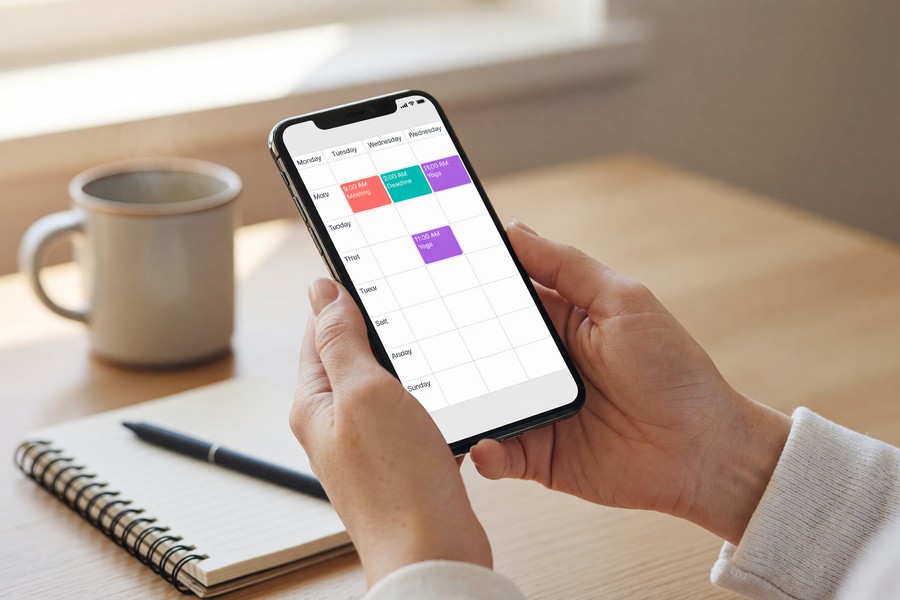
Google Calendar remains the most-used calendar app worldwide, with deep integrations across Gmail, Google Meet, and third-party tools. Its “Goals” feature uses machine learning to automatically schedule recurring personal goals — like a daily 20-minute walk — around your existing commitments.
If you want to go deeper on calendar-based scheduling, see our guide on using your phone calendar to actually stick to a schedule for practical setup strategies. The key is using time-blocking rather than simple event logging — treating every task as a booked appointment rather than a to-do list item.
Which Health and Fitness Apps Fit Seamlessly Into Your Day?
The top health apps for a daily routine are MyFitnessPal for nutrition, Strava for activity tracking, and Apple Health or Google Fit as central health data hubs. These tools work best when they share data rather than operate in silos.
MyFitnessPal: The Nutrition Tracking Standard
MyFitnessPal’s database of over 14 million foods makes it the most comprehensive calorie and macro tracker available. Its barcode scanner allows meal logging in under 10 seconds per item, removing the friction that causes most people to abandon nutrition tracking within a week.
The app integrates directly with over 50 fitness devices and apps, including Fitbit, Garmin, and Apple Watch. This means your calorie burn data flows automatically into your nutrition target calculations, giving you an accurate daily energy balance without manual entry.
Adults who log food daily using apps like MyFitnessPal lose 2.6 times more weight on average than non-loggers, according to a study published in the Journal of Medical Internet Research. Consistency of logging — not perfection — is the primary driver of results.
Strava and Platform Integration
Strava dominates activity tracking for runners, cyclists, and walkers, with a social layer that drives accountability. Its segment feature lets users compete on specific routes, adding a gamification element that increases workout consistency.
Lifestyle apps daily routine stacks benefit enormously from using a central health hub. Apple Health on iOS and Google Fit on Android aggregate data from all connected apps, providing a single dashboard for steps, sleep, heart rate, and nutrition without requiring manual syncing.
Which Mindfulness and Sleep Apps Actually Improve Your Wellbeing?
The most effective mindfulness apps are Headspace and Calm, while Sleep Cycle leads the sleep tracking category. Each has clinical or research backing that distinguishes them from the hundreds of generic meditation apps available.
Headspace vs. Calm: What the Research Shows
Headspace has published over 25 peer-reviewed studies on its effectiveness, making it one of the most scientifically validated consumer wellness apps. Calm, meanwhile, focuses more heavily on sleep content — its “Sleep Stories” narrated series has become one of the most-used sleep aids in the app ecosystem.
“Consistent use of guided meditation apps for as little as 10 minutes per day can produce clinically meaningful reductions in anxiety and improvements in focus within 30 days. The key variable is regularity, not session length.”
Sleep Cycle: Smart Alarm Technology
Sleep Cycle uses your phone’s microphone or accelerometer to detect sleep phases and wakes you during your lightest sleep stage within a 30-minute window. Users report feeling significantly more rested compared to fixed-time alarms, because the app avoids interrupting deep REM sleep.
For a detailed breakdown of how sleep tracking apps compare on accuracy and features, our guide on the best sleep tracking apps to improve your rest covers the top options side by side. Sleep quality directly impacts cognitive performance, making this one of the highest-leverage categories in any lifestyle apps daily routine stack.
Which Finance Apps Help You Manage Money Without the Stress?
The best finance apps for daily routine use are YNAB (You Need A Budget) for proactive budgeting and Mint or its successor Credit Karma for passive financial monitoring. These tools shift financial management from reactive to intentional.
YNAB: Zero-Based Budgeting Made Accessible
YNAB uses a zero-based budgeting method where every dollar is assigned a job before it is spent. According to YNAB’s internal data, new users save an average of $600 in their first two months and over $6,000 in their first year. The app connects to most major bank accounts and updates transactions automatically.
Security is a legitimate concern when connecting financial apps to bank accounts. Before linking any app, ensure you understand how your data is used — our guide on securing personal data after a data breach provides practical steps for protecting sensitive financial information on your devices.
Credit Karma: Passive Financial Health Monitoring
Credit Karma provides free credit score monitoring from TransUnion and Equifax, two of the three major U.S. credit bureaus. It sends alerts when significant changes occur — new accounts, hard inquiries, or score drops — allowing users to catch identity theft or errors early without actively checking their report.

How Do Smart Home Apps Automate Your Daily Routine?
Smart home apps like Google Home, Amazon Alexa, and Apple Home automate repetitive daily tasks — lighting, temperature, locks, and appliances — that collectively consume significant time and cognitive load. When integrated with your morning and evening routine, they create a hands-free environment that runs on schedule.
Choosing a Smart Home Ecosystem
The three dominant ecosystems — Google Home, Amazon Alexa, and Apple HomeKit — each have different strengths. Google Home integrates best with Android devices and Google Calendar. Alexa leads in third-party device compatibility. Apple HomeKit prioritizes privacy, processing most commands locally on-device rather than in the cloud.
If you are just getting started with home automation, our guide on connecting smart home devices without a hub explains how to build a functional setup without expensive central hardware. For users ready to go deeper, the best smart home hubs guide covers centralized control options that unify multiple ecosystems into one app.
Pairing a smart thermostat with a routine scheduling app can reduce home heating and cooling costs by up to 23% annually, according to the U.S. Department of Energy’s energy savings guidance. Over a decade, this represents thousands of dollars in savings with minimal lifestyle disruption.
How Do You Build the Right Lifestyle App Stack for Your Routine?
The ideal lifestyle apps daily routine stack is built around three principles: one app per category, full integration between apps, and regular weekly review. Overloading on apps creates the same friction they are supposed to eliminate.
The Core Five-App Daily Routine Stack
Most users need only five categories covered: task management, health tracking, mindfulness, finance, and calendar. Below is a comparison of the top apps by category, cost, and platform availability.
| Category | Top App | Free Tier | Paid Cost (Monthly) | Platform |
|---|---|---|---|---|
| Task Management | Todoist | Up to 5 projects | $4.00 | iOS, Android, Web |
| Nutrition Tracking | MyFitnessPal | Basic logging | $19.99 | iOS, Android |
| Mindfulness | Headspace | Limited content | $12.99 | iOS, Android, Web |
| Sleep Tracking | Sleep Cycle | Basic alarm | $9.99 | iOS, Android |
| Budgeting | YNAB | 34-day trial | $14.99 | iOS, Android, Web |
| Calendar | Google Calendar | Full features | Free | iOS, Android, Web |
| Smart Home | Google Home | Full features | Free | iOS, Android |
Integration and Privacy Considerations
Every lifestyle app that connects to sensitive data — banking, health records, location — requires careful permission management. Review app permissions quarterly and revoke access for apps you no longer use actively. Strong account security, including two-factor authentication, is essential for any app that stores financial or health data.
Understanding what two-factor authentication is and how to use it is a non-negotiable baseline for protecting your lifestyle app accounts. For productivity apps with note-taking features that may contain personal plans or sensitive information, also consider what metadata those services collect — our explainer on what message metadata is and who can see it applies equally to many app platforms.
Audit your lifestyle app stack every 90 days. Delete any app you have not opened in 30 days, review permissions for all connected accounts, and test whether your current tools still align with your goals. A leaner, more intentional stack consistently outperforms a bloated one. Fewer apps used consistently beat many apps used sporadically.
Frequently Asked Questions
What are the best free lifestyle apps for daily routine management?
Google Calendar, Google Fit, and Todoist’s free tier offer robust daily routine management at no cost. Google Calendar in particular provides full scheduling functionality including recurring events, goal-setting, and cross-platform sync without requiring a subscription. These three apps together cover calendar, fitness, and task management for most users.
How many apps should be in a daily routine app stack?
Most productivity experts recommend no more than five to seven apps covering distinct categories. Overlapping apps in the same category — such as two separate task managers — create duplication and decision fatigue rather than efficiency. One app per function, fully integrated where possible, is the optimal approach.
Are lifestyle apps safe for storing personal health and financial data?
Reputable apps from established companies like MyFitnessPal, YNAB, and Headspace use industry-standard encryption and comply with data protection regulations including HIPAA (for health data) and GDPR (for European users). You should always enable two-factor authentication and review what data sharing permissions each app requests. Avoid granting unnecessary access to contacts, location, or microphone unless the feature requires it.
Can lifestyle apps actually change daily habits long-term?
Yes, when used consistently alongside behavioral strategies. Research from the American Psychological Association shows that self-monitoring — the core mechanism in most lifestyle apps — is one of the most effective behavior change techniques available. The key is anchoring app use to existing habits, such as logging breakfast immediately after eating rather than trying to recall meals at the end of the day.
What is the best app for building a morning routine?
Fabulous and Routinery are purpose-built morning routine apps that guide users through timed habit sequences. However, many users achieve the same outcome using Google Calendar time-blocks combined with a habit tracker like Streaks (iOS) or Habitica (iOS and Android). The best app is the one you will open consistently — simplicity beats feature richness.
Do lifestyle apps work better together or separately?
Integrated apps work significantly better. When MyFitnessPal shares calorie burn data with your fitness tracker, and your sleep app informs your morning alarm, and your calendar accounts for workout time, you have a system rather than a collection of tools. Use Apple Health or Google Fit as a central data hub to connect health apps automatically.
How do lifestyle apps daily routine tools handle privacy?
Privacy practices vary significantly by app. Health and finance apps in the U.S. are subject to FTC oversight and, in the case of health data, HIPAA guidelines. Always read the privacy policy before granting sensitive permissions, and consider limiting location tracking to “only while using the app” rather than “always.” Regularly checking your device’s privacy settings is the most reliable safeguard.
Sources
- Statista — Global Productivity App Market Size 2024
- American Psychological Association — Self-Monitoring and Goal Achievement Research
- MyFitnessPal — About Page: User and Database Statistics
- Headspace — Published Science and Clinical Research
- U.S. Department of Energy — Energy Savings from Smart Thermostats
- National Institutes of Health / JMIR — Digital Food Logging and Weight Loss Outcomes
- RescueTime — Productivity and App Usage Statistics
- DataReportal — Digital 2024 Global Overview Report
- YNAB — The YNAB Method and Average User Savings Data