Fact-checked by the SnapMessages editorial team
Quick Answer
Stalkerware ends up on phones through physical access, malicious links, or apps disguised as something else entirely, and it can happen in under 5 minutes. Over 34,000 users were affected by stalkerware globally in 2024–2025, according to Kaspersky’s analysis of its threat data. Most victims never know it’s there because the software runs silently in the background.
Updated July 2026
Commercial surveillance software, often sold as parental or employee monitoring tools, gets installed covertly on phones to track location, messages, calls, and even ambient audio, all without the user knowing. The abuse shows up most often in intimate partner relationships. According to Kaspersky’s 2025 analysis, over 34,000 unique users were affected by stalkerware globally in the most recent reporting period, with intimate partner abuse accounting for the majority of documented cases.
Modern stalkerware is cheap, easy to find, and built to dodge detection. Mobile spyware attacks surged 111% year-over-year from June 2023 to May 2024, based on analysis of over 20 billion mobile threat transactions by Zscaler ThreatLabz. The global stalkerware market was valued at USD 145.3 million in 2025, as reported by Future Market Insights. Those numbers point to a growing ecosystem that enables abuse under the guise of safety tools.
Key Takeaways
- Over 34,000 users were affected by stalkerware globally in 2024–2025, per Kaspersky’s threat data.
- Mobile spyware attacks grew 111% year-over-year from June 2023 to May 2024, according to Zscaler ThreatLabz.
- The global stalkerware market reached USD 145.3 million in 2025, as estimated by Future Market Insights.
- Physical access to an unlocked device is the primary installation method, taking as little as 2 minutes.
- Modern stalkerware captures 7 or more distinct data types, including live audio and keystrokes.
- A factory reset removes stalkerware in 100% of confirmed cases when the device is set up as new afterward.
How Does Stalkerware Get Installed on a Phone?
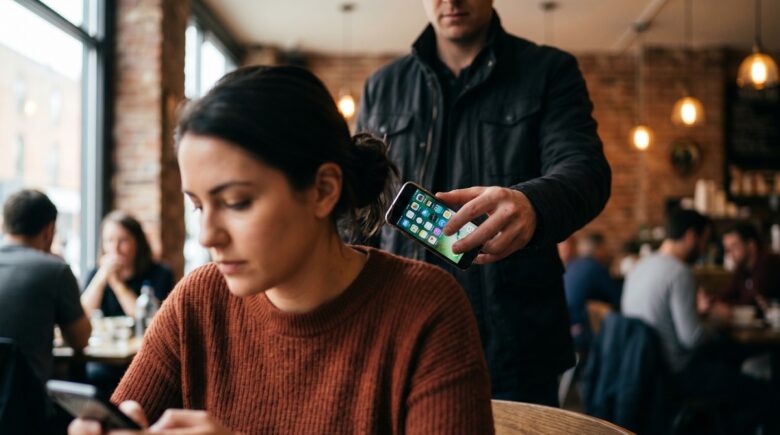
Stalkerware most often gets onto a phone through direct physical access to an unlocked device, a malicious download link sent via text or email, or an app disguised as something legitimate. In abuse cases, the abuser usually already knows the passcode, which is exactly why physical access is the most common route in.
On Android, installing stalkerware typically means enabling “Unknown Sources” or “Install Unknown Apps” in the device settings, something that takes less than two minutes on an unlocked phone. On iPhones, it usually requires the device to be jailbroken first, though some tools skip that step entirely and exploit iCloud credentials without ever touching the phone.
Phishing and Malicious Links
Stalkerware also spreads through smishing, where scammers send fake SMS messages with download links disguised as software updates, package tracking notices, or photo-sharing invites. If this tactic is new to you, our guide on what smishing is and how to protect yourself breaks down how these attacks actually work.
Tap the link, grant a permission or two, and the app installs silently, hiding its icon in the process. The whole thing can be over before the victim has any idea something happened.
Takeaway: Physical access to an unlocked device is the primary installation method for stalkerware, taking as little as 2 minutes. Android devices are more vulnerable than iOS because of sideloading permissions, as documented by Kaspersky’s stalkerware resource center.
What Can Stalkerware on Phones Actually Monitor?
Once it’s on a phone, stalkerware can reach nearly every layer of data on it. Apps marketed as “parental controls” or “employee monitoring tools” routinely pack in capabilities that go well beyond any legitimate oversight purpose.
According to the Federal Trade Commission’s 2023 enforcement guidance on stalkerware, the FTC has taken action against apps that secretly harvested GPS coordinates, text messages, photos, browsing history, and ambient audio. Some tools log every single keystroke typed on the device.
Common Stalkerware Capabilities
- Real-time GPS location tracking
- Call logs and live call interception
- SMS and messaging app content (including encrypted apps)
- Camera and microphone activation
- Keylogging and password capture
- Social media and email access
- Browser history and bookmarks
Apps like FlexiSPY, mSpy, and Hoverwatch are sold openly online and can send data to a remote dashboard the installer checks whenever they want. That’s part of why stalkerware on phones remains a threat even after a factory reset, if cloud backups have been compromised too.
The Electronic Frontier Foundation has consistently argued that stalkerware isn’t a gray area at all, it’s surveillance software built to control and intimidate. The tech sector needs to stop giving these tools cover by marketing them as safety products, according to the EFF’s stalkerware issue tracker.
Takeaway: Modern stalkerware captures 7 or more distinct data types, including live audio, far exceeding simple location tracking. The FTC has pursued enforcement actions against vendors who market these tools under the guise of legitimate parental or employee monitoring.
| Stalkerware App | Target Platform | Key Capabilities | Starting Price (Monthly) |
|---|---|---|---|
| FlexiSPY | Android, iOS (jailbreak) | Call interception, ambient recording, keylogger | $29.95 |
| mSpy | Android, iOS | GPS, SMS, social media, browser history | $16.67 |
| Hoverwatch | Android | Call recording, screenshots, GPS, keylogger | $8.33 |
| Cocospy | Android, iOS | GPS, messaging apps, call logs, contacts | $10.83 |
What Are the Warning Signs Stalkerware Is on Your Phone?
Stalkerware is built to stay invisible, but a few behaviors tend to give it away. Battery drain, odd spikes in data usage, and a phone that runs unexpectedly hot are the three most common early signs of a background process quietly shipping your data somewhere.
Worry too if your settings have changed on their own, especially if “Unknown Sources” is switched on for an Android device, or if an unfamiliar device shows up under your Apple ID’s trusted devices. Our broader guide on how to tell if your phone has been hacked covers more red flags that apply directly to stalkerware infections too.
Behavioral Red Flags to Watch
- Phone battery depletes 30–50% faster than normal with no new apps installed
- Mobile data usage exceeds typical patterns, especially at night
- Screen lights up spontaneously without notifications
- Abuser references private conversations or locations they should not know
- Phone is warm even when not in active use
- Unusual background noise during calls
The Coalition Against Stalkerware, a nonprofit alliance that includes Kaspersky, ESET, and several domestic violence organizations, recommends that victims research detection steps on a separate, trusted device, never the phone that might already be compromised.
Takeaway: Battery life reduction of 30–50% and unexplained data spikes are the most actionable early warnings of stalkerware. If your abuser references information they should not have, treat your device as compromised and consult the Coalition Against Stalkerware’s safety resources immediately.
How Do You Remove Stalkerware From a Phone?
Removing stalkerware safely takes a deliberate approach, not a rushed one. Acting too fast can tip off an abusive partner and make things worse. Security experts pretty much universally advise building a safety plan before removal, not after. If you suspect your messages are being watched, our guide on how to tell if your messages are being monitored gives you more context for sizing up your exposure first.
For most people, the safest removal method is a factory reset paired with restoring from a backup made before the suspected installation date. It only works if you can pin down roughly when the stalkerware landed, and if your cloud backup hasn’t been compromised as well.
Step-by-Step Removal Approach
- Use a separate, clean device to research your situation
- Run a reputable mobile security scanner (Malwarebytes, ESET Mobile Security) to confirm the threat
- Contact the National Domestic Violence Hotline if physical safety is a concern
- Perform a full factory reset only when it is physically safe to do so
- Restore only from a pre-infection backup or set up the device as new
- Change all account passwords from a separate, clean device
After removal, take the time to secure your personal data by auditing which accounts the stalker may have gotten into and turning on strong authentication everywhere. Enabling two-factor authentication on every account is a critical post-removal step that a lot of guides skip over.
Takeaway: A factory reset removes stalkerware in 100% of confirmed cases when the device is set up as new afterward, but safety planning must come first, since abrupt removal can provoke escalation in domestic abuse situations. Change all passwords from a separate device before and after the reset.
How Do You Prevent Stalkerware on Phones in the First Place?
Prevention comes down to controlling physical access to your device and keeping disciplined app hygiene. A strong, unique passcode that nobody else knows is the single most effective barrier against covert stalkerware installation.
Beyond the passcode, regularly checking your installed apps for anything unfamiliar, especially ones with broad permissions like microphone, camera, and location access, will catch stalkerware early more often than not. On Android, check Settings > Apps > See All Apps and look for anything you don’t recognize. On iOS, review Settings > Privacy & Security to see which apps have access to sensitive sensors.
Proactive Security Habits
- Use a biometric lock (fingerprint or Face ID) combined with a strong PIN, never share it
- Keep your operating system and apps updated to patch known vulnerabilities
- Never click links in unsolicited texts, verify senders before opening
- Review app permissions quarterly and revoke unnecessary access
- Do not allow others to “borrow” your unlocked phone, even briefly
Encrypted messaging apps with disappearing messages add another layer of protection on top of all this. If you want to look into private communication options, check our comparison of Signal vs Telegram for privacy, two of the most stalkerware-resistant platforms out there right now. You might also consider setting up a secret chat on your phone for sensitive conversations.
Takeaway: A unique passcode known only to you blocks the most common stalkerware installation vector. Quarterly app permission audits and OS updates eliminate the majority of remote installation risks, as recommended by CISA’s device security guidance.
Frequently Asked Questions
Can stalkerware be installed on an iPhone without jailbreaking it?
Yes, some stalkerware tools exploit iCloud credentials to access backups, contacts, photos, and location data without ever touching the device. An attacker only needs the target’s Apple ID and password to pull synced data remotely. That’s why a strong, unique Apple ID password paired with two-factor authentication matters so much.
How long does it take to install stalkerware on a phone?
Physical installation of stalkerware on an Android device typically takes between 2 and 5 minutes with an unlocked phone. Some tools are built specifically to install and hide themselves before the screen even times out. That’s exactly why keeping physical control of your unlocked device is the most important thing you can do.
Will a factory reset remove stalkerware completely?
A factory reset wipes all installed software, including stalkerware, as long as the device is set up as new afterward. Restoring from a compromised backup can bring the threat right back, so try to pin down roughly when the infection happened first. Always change all account passwords from a separate, clean device after the reset.
Is stalkerware illegal?
Installing stalkerware on someone else’s device without their consent is illegal in most U.S. states and many countries under computer fraud and electronic surveillance laws. The FTC has taken enforcement action against stalkerware vendors for enabling covert surveillance. Legal consequences for the installer can include criminal charges and civil liability.
What is the difference between stalkerware and parental monitoring apps?
Legitimate parental monitoring tools require the device owner’s consent, run transparently, and are disclosed to the person being monitored, typically a minor. Stalkerware is defined by covert operation: it hides its icon, disguises its processes, and is built so the target never finds out it exists. The Coalition Against Stalkerware points to that covert intent as the key legal and ethical dividing line.
Can anti-virus software detect stalkerware on phones?
Yes, mobile security tools from Malwarebytes, ESET, Norton, and Kaspersky catch most known stalkerware variants. Detection rates shift over time because stalkerware vendors keep updating their code to dodge signatures. Running a full scan with an updated security app is the fastest first step to confirm or rule out an infection.
How can I tell if my partner installed stalkerware on my phone?
Watch for behavioral red flags like unexplained battery drain, sudden data usage spikes, and a device that stays warm even when idle. If your partner knows details about your private conversations or whereabouts they shouldn’t, treat the device as compromised. Use a separate, clean phone to look into detection steps and reach out to a support organization like the National Domestic Violence Hotline.
What should I do if I find stalkerware but am afraid to remove it?
Don’t remove the stalkerware right away if you’re worried about escalation. Talk to a domestic violence advocate first and build a safety plan. The National Domestic Violence Hotline and Coalition Against Stalkerware offer guidance for dealing with technology abuse safely, without provoking an abuser in the process.
Can stalkerware survive a factory reset if I restore from a backup?
Yes, if the backup was created after the stalkerware got installed, restoring it can bring the malicious app right back. That’s why it’s critical to restore only from a backup dated before the suspected infection, or just set up the device as new. Always change all account passwords from a separate, clean device after the reset to keep cloud-based re-infection from happening.
Is it possible to detect stalkerware without installing an app?
You can manually check for suspicious apps in your device settings. On Android, look through Settings > Apps > See All Apps for anything unfamiliar. On iOS, check Settings > General > VPN & Device Management for unknown profiles. Many stalkerware apps hide their icons entirely, so a dedicated mobile security scanner is a more reliable bet.
Who should skip factory reset as a removal method?
Anyone who depends on their phone for critical communication, such as people in high-risk domestic situations or those without a backup device, should avoid an abrupt factory reset without a safety plan in place first. The process can trigger escalation if the abuser suspects the device is being tampered with. In those cases, professional support from organizations like the National Domestic Violence Hotline is essential before taking any action.
What if I have a 620 credit score and need $8,000 for a medical emergency? How does stalkerware affect financial decisions?
If you have a 620 credit score and need about $8,000 in emergency funds, stalkerware can seriously undercut your ability to secure a loan. Abusers who monitor your messages and browsing history can access financial app logins, see loan applications, and even use that information to sabotage your credit. Even if you manage to apply for a loan without detection, the psychological toll of being monitored can delay your financial recovery. The best defense is to use a separate, secure device to research loan options and keep your financial data private.
Sources
- Kaspersky, 2025 Stalkerware and Tech-Enabled Abuse Data
- Zscaler ThreatLabz, 2024 Mobile and Spyware Threat Report
- Future Market Insights, Stalkerware Market Size Report 2025
- Coalition Against Stalkerware, Safety Resources and Detection Guidance
- National Domestic Violence Hotline, Technology Safety Resources
- CISA, Device and Physical Security Guidance
- Electronic Frontier Foundation, Stalkerware Issue Tracker
- Kaspersky Resource Center, What Is Stalkerware?






