Fact-checked by the Snapmessages editorial team
Quick Answer
Two-factor authentication (2FA) requires users to verify their identity with two separate credentials before accessing an account., accounts protected by 2FA block 99.9% of automated cyberattacks, according to Microsoft. It takes under 30 seconds to set up and is one of the most effective free security measures available.
Two-factor authentication explained: it is a security process that requires two distinct forms of verification, typically something you know (a password) and something you have (a phone or hardware key), before granting access to an account. According to Microsoft’s security research, enabling 2FA blocks 99.9% of automated account attacks, making it one of the single most impactful security upgrades a user can make.
With data breaches hitting record numbers and messaging apps storing increasingly sensitive conversations, understanding how 2FA works has never been more urgent. This guide covers how 2FA functions, which methods are strongest, where to enable it first, and whether the minor friction is worth the protection.
Key Takeaways
- 99.9% of automated attacks are blocked by 2FA, according to Microsoft’s security blog.
- Only 26% of users had enabled 2FA on their Google accounts as of recent surveys, per Google’s Security Blog.
- SMS-based 2FA is vulnerable to SIM-swapping attacks, which the FBI has formally warned against.
- Authenticator app codes expire in 30 seconds, making them far harder to intercept than static passwords, per IETF’s TOTP standard (RFC 6238).
- Hardware security keys like YubiKey offer the strongest 2FA protection, achieving a 0% phishing success rate in Google’s internal deployment, per KrebsOnSecurity’s reporting on Google’s rollout.
In This Guide
- What Exactly Is Two-Factor Authentication?
- How Does Two-Factor Authentication Actually Work?
- What Are the Different Types of Two-Factor Authentication?
- Is SMS Authentication Safe Enough?
- Where Should You Enable Two-Factor Authentication First?
- Is Two-Factor Authentication Worth the Hassle?
- Frequently Asked Questions
What Exactly Is Two-Factor Authentication?
Two-factor authentication is a login security method that requires users to provide two independent credentials from different categories before access is granted. The core idea is simple: if a thief steals your password, they still cannot get in without the second factor.
The three recognized factor categories are: something you know (password or PIN), something you have (phone, hardware key, or authenticator app), and something you are (fingerprint or face scan). True 2FA combines two of these categories, using two passwords counts as single-factor, not two-factor.
Why “Two Factors” Specifically?
A single password is a single point of failure. If it is reused, guessed, or exposed in a breach, the account is fully compromised. Adding a second, independent factor means an attacker would need to breach two separate systems or steal two separate things simultaneously.
This principle is formalized in standards published by the National Institute of Standards and Technology (NIST) in Special Publication 800-63B, which governs digital identity guidelines for federal agencies and widely influences private-sector security policies. Financial institutions regulated by the FDIC and banks like Chase increasingly reference NIST 800-63B when designing customer authentication systems. The Federal Reserve and the Consumer Financial Protection Bureau (CFPB) have both emphasized multi-factor authentication in guidance to financial services firms, reflecting how thoroughly these standards have moved from government IT into everyday banking.
The term “two-factor authentication” is sometimes used interchangeably with “multi-factor authentication” (MFA), but MFA can involve three or more factors. Most consumer services use exactly two, which is why 2FA is the more common label.
How Does Two-Factor Authentication Actually Work?
The process adds a verification step after your password is accepted. The server confirms your password is correct, then immediately challenges you to prove you also possess the second factor, typically a one-time code or a physical device.
The sequence is always the same: enter username and password, pass that check, then complete the second verification within a short time window (usually 30 to 90 seconds). Only after both checks pass does the system open the account.
The Role of TOTP Codes
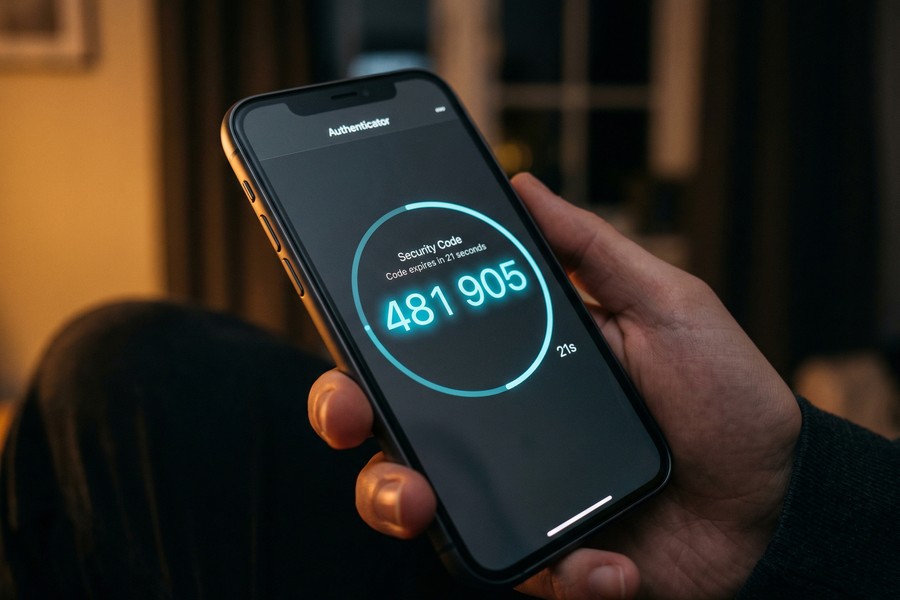
Time-Based One-Time Passwords (TOTP) are the most common second factor. They are generated by an app like Google Authenticator or Authy using a shared secret key and the current timestamp. Per the IETF’s RFC 6238 TOTP standard, codes regenerate every 30 seconds and are mathematically linked to your specific account, making them essentially impossible to reuse or predict.
Because the code is generated locally on your device and never transmitted over a network until you type it, it is far more resistant to interception than a password sent over email. Apps like Microsoft Authenticator follow the same RFC 6238 standard, so codes from any compliant app work interchangeably across services that support TOTP.
What Are the Different Types of Two-Factor Authentication?
There are five primary types of 2FA, ranging from widely available to highly secure. Each involves different trade-offs between convenience and protection level.
| 2FA Method | Security Level | Phishing Resistant | Setup Difficulty |
|---|---|---|---|
| Hardware Key (FIDO2) | Highest | Yes | Moderate |
| Authenticator App (TOTP) | High | Partial | Low |
| Push Notification | Medium-High | Partial | Low |
| SMS One-Time Code | Medium | No | Very Low |
| Email One-Time Code | Low-Medium | No | Very Low |
Hardware Security Keys
Hardware keys such as YubiKey (made by Yubico) and Google Titan Security Key use the FIDO2/WebAuthn protocol. They require physical possession of the key and cryptographic proof, no code to intercept or phish. Google reported zero successful phishing attacks among its 85,000 employees after mandating hardware keys, as documented by KrebsOnSecurity.
According to CISA (the Cybersecurity and Infrastructure Security Agency), hardware keys using FIDO2 are the only consumer-grade option that fully eliminates phishing as a threat vector for 2FA. That makes them the strongest available credential for anyone who wants protection that cannot be social-engineered away. The trade-off is cost: a YubiKey runs $25 to $60, and losing it without backup codes or a spare key means a more complicated account recovery process.
Authenticator Apps
Apps like Google Authenticator, Authy, and Microsoft Authenticator generate TOTP codes offline. They are significantly more secure than SMS and work even without cellular service. This is the method most security professionals recommend as the baseline for everyday users.
Is SMS Authentication Safe Enough?
SMS-based 2FA is better than nothing, but it carries a specific and well-documented vulnerability: SIM swapping. In a SIM swap attack, a criminal convinces a carrier to transfer your phone number to their SIM card, redirecting all your texts, including 2FA codes, to their device.
The FBI has issued formal warnings about SMS-based authentication attacks, and the NIST deprecated SMS as a recommended 2FA channel in its 800-63B guidelines, citing interception risks through SS7 protocol vulnerabilities.
When SMS Is Still Acceptable
For low-risk accounts, a streaming service, a newsletter subscription, SMS 2FA still provides meaningful protection against credential-stuffing attacks. The FBI estimates that over 80% of hacking-related breaches involve compromised passwords, and even SMS 2FA stops most of those automated attacks cold.
If your account holds financial data, health records, or sensitive messages, skip SMS and use an authenticator app or hardware key instead. Accounts at financial institutions like Chase, SoFi, or any FDIC-insured bank deserve at least authenticator-app protection given the direct monetary exposure. If you are already thinking carefully about your messaging security, our guide to what end-to-end encryption is and why it matters pairs well with understanding 2FA.
SIM-swapping complaints to the FBI jumped 400% between 2018 and 2021, with losses exceeding $68 million in that period alone, according to the FBI’s Internet Crime Complaint Center (IC3).
Where Should You Enable Two-Factor Authentication First?
Prioritize 2FA on accounts that act as a “master key” to your digital life, email, then financial accounts, then social media and messaging apps. If an attacker owns your email, they can reset passwords on nearly every other account you hold.
Protecting Gmail, Outlook, or Apple ID is the single highest-leverage move you can make in personal account security. After those three, move to your bank, then platforms like Facebook, Instagram, WhatsApp, and Telegram. Anyone with a credit file at Experian, Equifax, or TransUnion should also lock down those bureau accounts, since a breach there could affect your FICO Score and expose sensitive financial history.
Enabling 2FA on Messaging Apps
Most major messaging platforms now support 2FA natively. WhatsApp calls it “Two-Step Verification” and adds a six-digit PIN to account registration. Signal offers a registration lock tied to a PIN. Telegram supports a two-step verification password layered over its SMS login code.
Given that messaging apps contain private conversations and often link to your contacts and financial tools, securing them matters. Our comparison of Signal vs. Telegram and which app actually protects you covers each app’s full security model, including 2FA implementation details.
Also worth reviewing: if you are unsure whether your device has already been compromised, check our breakdown of how to tell if your phone has been hacked before relying solely on 2FA.
Google automatically enrolled users in 2FA starting in 2021, increasing its active 2FA user base from roughly 26% to over 150 million users within the first year, according to Google’s Security Blog.
Is Two-Factor Authentication Worth the Hassle?
Yes, unambiguously. The friction of entering a second code takes roughly five to ten seconds per login. The protection it provides against credential theft, phishing, and automated attacks is measurable and substantial. There is no meaningful security upgrade with a better effort-to-reward ratio.
From a cost-benefit angle: the average cost of a personal data breach to individuals, in time spent recovering accounts, disputing charges, and replacing compromised credentials, runs into dozens of hours and potentially hundreds of dollars. The time investment in setting up 2FA is under five minutes per account. For anyone who manages finances through an app tied to a FICO Score or an account at a lender like SoFi, the asymmetry between setup cost and potential loss is stark.
What 2FA Cannot Protect Against
2FA does not protect against malware already running on your device, which can intercept codes in real time. It also does not protect against social engineering attacks where a user is tricked into entering their code on a fake site, a threat that only hardware keys using FIDO2 fully neutralize.
Understanding the limits of any security layer matters. Privacy-conscious users should also understand what message metadata is and who can see it, because 2FA secures your account login but does not protect the metadata generated by your communications. Layering protections across encryption, authentication, and privacy settings is the complete picture.
CISA recommends multi-factor authentication as one of its core “Shields Up” guidance points for both individuals and organizations. Their guidance is publicly available at cisa.gov/mfa and includes step-by-step instructions for enabling 2FA across major platforms.
When setting up 2FA, most services offer backup codes, a set of one-time-use codes to access your account if you lose your phone. Store these in a password manager like Bitwarden or 1Password, or print them and keep them in a secure physical location. Never save them in a plain text file on your desktop.
Related reading: Should You Use Notion or ClickUp for Long.
Frequently Asked Questions
What is two-factor authentication explained simply?
Two-factor authentication is a two-step login process where you first enter your password, then confirm your identity a second way, usually via a code on your phone. It ensures that a stolen password alone is not enough to access your account.
Is two-factor authentication the same as two-step verification?
Not exactly. True 2FA requires two different factor types (e.g., password plus hardware key). Two-step verification can mean two steps using the same factor type, such as a password then an emailed code. In everyday usage, both terms are often used interchangeably by consumer platforms.
Can two-factor authentication be hacked?
It can be circumvented in specific scenarios: SIM swapping can defeat SMS 2FA, and real-time phishing proxies can steal TOTP codes before they expire. Hardware keys using FIDO2 are the only method that fully resists these attacks. For most users, authenticator apps like Google Authenticator or Authy are a practical and strong middle ground.
What happens if I lose my phone with my authenticator app?
You would use your backup codes, provided during 2FA setup, to access the account. You can then disable 2FA temporarily and re-enroll on a new device. This is why storing backup codes securely is a critical step in any 2FA setup.
Should I use SMS or an authenticator app for 2FA?
Use an authenticator app whenever possible. SMS 2FA is vulnerable to SIM swapping and SS7 protocol attacks. Authenticator apps generate codes locally on your device and are not tied to your phone number, making them significantly harder to intercept.
Which accounts most urgently need two-factor authentication?
Start with email (it controls password resets for everything else), then online banking, then social media and messaging apps. Any account that stores payment details, personal health information, or communications should have 2FA enabled. This includes accounts at lenders like SoFi or banks like Chase, credit monitoring accounts at Experian, and platforms like WhatsApp and Telegram, which store private conversations.
Does two-factor authentication slow down my login?
It adds roughly five to ten seconds per login when using an authenticator app, or two to three seconds with a hardware key tap. Most platforms also offer a “trust this device” option that skips 2FA for recognized devices, reducing friction for everyday use.
Does 2FA protect my financial accounts from fraud?
It significantly reduces the risk of unauthorized access, but it is not a complete fraud prevention system. Enabling 2FA on accounts at FDIC-insured banks or financial platforms regulated by the CFPB blocks most credential-based attacks. It does not, however, protect against fraud initiated after a legitimate login, such as authorized push payment scams where you are tricked into moving money yourself.
Do credit bureaus like Experian support 2FA?
Yes. Experian, Equifax, and TransUnion all offer 2FA for their consumer-facing portals. Securing these accounts matters because access to a credit bureau account exposes your full credit history, Social Security number, and any existing fraud alerts, information that could be used to open new lines of credit in your name and damage your FICO Score.
Is 2FA required by any regulators?
Certain sectors face formal requirements. The Federal Reserve and FDIC have issued guidance requiring multi-factor authentication for bank employees accessing sensitive systems. The CFPB has incorporated MFA expectations into its data security oversight. For consumers, 2FA is generally voluntary, but CISA and NIST both recommend treating it as mandatory for any account with financial or personal data exposure.
Sources
- Microsoft Security Blog, One Simple Action to Prevent 99.9% of Account Attacks
- NIST, Special Publication 800-63B: Digital Identity Guidelines
- Google Security Blog, Making Sign-In Safer and More Convenient
- KrebsOnSecurity, Google: Security Keys Neutralized Employee Phishing
- IETF, RFC 6238: TOTP Time-Based One-Time Password Algorithm
- CISA, More Than a Password: Multi-Factor Authentication






