Updated June 2026
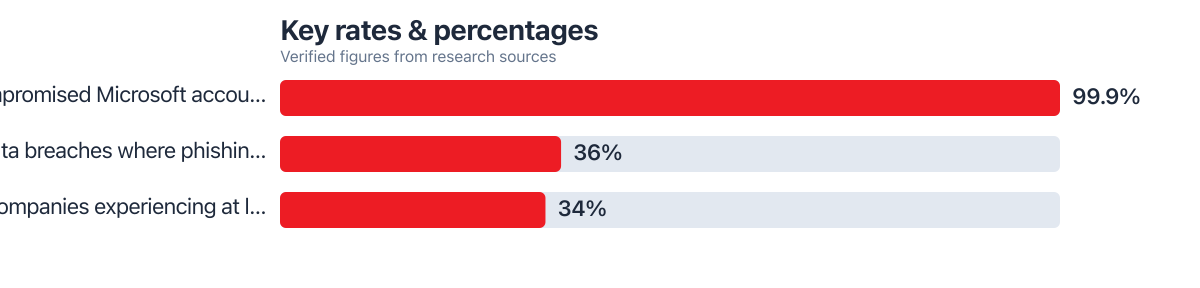
Microsoft’s own account data puts the scale of the problem in stark terms: 99.9% of compromised Microsoft accounts had no multi-factor authentication enabled at all, according to Microsoft’s 2025 security guidance. That number sounds like a simple argument for turning on 2FA everywhere, including your patient portal, your pharmacy app, and your therapy platform. The real story in 2026 is more complicated. The 2FA risks 2026 patients and wellness app users face are different from the ones covered in most basic security guides.
Attackers have adapted. Phishing kits built specifically to defeat two-factor logins, like Tycoon 2FA, now handle a majority of real-time phishing attempts against everyday users. Verizon’s 2025 Data Breach Investigations Report found that 36% of breaches still start with phishing, according to Verizon’s 2025 findings. A large share of those attempts now target the authentication step itself, not just the password. Barracuda’s 2026 threat report found that 34% of companies experience at least one account takeover every single month, even with MFA policies in place, per Barracuda’s 2026 email threats report. Fraud losses reported to the FTC hit $12.5 billion in 2024 alone, based on FTC enforcement data, a figure that keeps climbing as scams get more targeted. Regulators like the CFPB and the Federal Reserve have flagged similar account-takeover trends in consumer banking, where a compromised login can ripple into credit files tracked by Experian and pull down a FICO Score through no fault of the account holder.
By the end of this article, you’ll know which 2FA methods actually resist modern attacks. You’ll know which ones are quietly becoming liabilities for people managing chronic conditions or mental health records. And you’ll know how to rebuild your login setup without creating new points of failure. This isn’t theoretical. It’s a practical rundown built from federal guidance, vendor breach data, and the specific ways health and wellness accounts get compromised.
Key Takeaways
- 99.9% of compromised Microsoft accounts had no MFA enabled at all, but enabled MFA is not automatically safe from modern phishing kits.
- 36% of breaches in 2025 started with phishing, and a growing share targeted the 2FA step directly rather than just passwords.
- 34% of companies report at least one account takeover monthly despite widespread MFA adoption, per 2026 Barracuda data.
- CISA and NIST both now recommend phishing-resistant MFA (FIDO/WebAuthn) over SMS codes, authenticator apps, and push notifications.
- FTC-reported fraud losses reached $12.5 billion in 2024, with health-adjacent scams increasingly using stolen 2FA codes.
- Recovery from a lost 2FA device can lock chronic-illness patients out of medication and lab portals for days, a risk rarely discussed in general security guides.
In This Guide
- Why Your Health Apps and Patient Portals Need Stronger Protection Than You Think
- SMS 2FA Is Still the Convenience Trap Dominating Health Logins
- AI-Powered Attacks That Bypass Your 2FA Codes Without You Noticing
- MFA Fatigue and the Daily Drain on Wellness Routines
- What Actually Works Better for Health Accounts
- The Privacy Ripple Effects No One Discusses After a 2FA Breach
- 2FA Risks 2026: Edge Cases for Elderly Patients and Chronic Conditions
- Wearable Devices and the Hidden 2FA Chain Reaction
- Recovery and Lockout: What Happens When 2FA Fails You
- Mental Health and Recovery Apps Face a Stigma That Amplifies the Damage
Why Your Health Apps and Patient Portals Need Stronger Protection Than You Think
Your patient portal holds more sensitive material than your bank account. Lab results, prescription histories, mental health notes, and insurance details sit behind a single login screen. Most people protect that screen with the same casual mindset they use for a shopping app.
That mismatch matters. A stolen banking credential, the kind SoFi or Chase might flag within hours, gets you a fraud alert and a new card within days. A stolen health record follows you for years. It can be used to file fraudulent insurance claims, obtain prescriptions in your name, or blackmail someone over a diagnosis they haven’t told family about. The stakes are structurally different, yet the authentication protecting them is often identical to what guards a streaming subscription.
By mid-2026, most major telehealth platforms and insurance portals have quietly moved away from password-only logins toward some form of two-factor authentication. That shift sounds like progress, and mostly it is. The transition has been uneven, though. Some platforms adopted strong, phishing-resistant methods. Others bolted on the cheapest option available, which is usually SMS codes, and called it done.
The result is a patchwork where your primary care portal might use a secure authenticator app while your pharmacy’s refill app still texts you a six-digit code. Attackers know this. They target the weakest link in your personal ecosystem of accounts, not the strongest one. Understanding the actual 2FA risks 2026 users face means looking at each platform individually rather than assuming “2FA” means one consistent level of protection.
99.9% of compromised Microsoft accounts had no MFA enabled at all, according to Microsoft’s 2025 data. Having any form of two-factor authentication remains far better than having none.
The Shift From Passwords to Authentication as a Category
Security teams increasingly talk about “authentication strength” rather than “having 2FA or not.” That’s a meaningful change in framing. A text message code and a hardware security key are both technically two-factor authentication, but they sit at opposite ends of a spectrum. The gap between them is exactly where most account takeovers now happen.
SMS 2FA Is Still the Convenience Trap Dominating Health Logins
SMS codes remain the most common form of 2FA on health platforms, largely because they require no app download and work on any phone. That convenience is precisely why they’re also the weakest option available. CISA has been explicit that not all MFA technologies provide equal protection, naming SMS codes specifically as vulnerable to bypass attacks.
SIM swapping is the attack most people have heard of: a criminal convinces a carrier to port your phone number to a new SIM card, then intercepts every code sent to “your” number. Interception doesn’t require that level of effort anymore, though. SS7 network vulnerabilities, a decades-old flaw in telecom infrastructure, allow sophisticated attackers to intercept text messages without touching your phone at all. CISA’s guidance flags this exact combination of SIM swap and SS7 exposure as a reason to move away from SMS-based codes entirely.
For a healthy 28-year-old checking a step-tracking app, an SMS compromise is annoying. For someone managing diabetes who relies on a portal to refill insulin prescriptions, a hijacked account can mean a scammer redirecting a prescription, changing a shipping address, or locking the real patient out during a moment that matters. The stakes scale with what’s behind the login. Pharmacy and insurance portals often protect the most consequential accounts with the least resilient method.
NIST has reached the same conclusion from a different angle, noting that OTPs and SMS-based codes remain susceptible to phishing in ways that phishing-resistant authenticators are specifically designed to prevent. Both agencies converge on the same practical advice: SMS is better than nothing, but it should not be anyone’s long-term plan for protecting sensitive accounts.
If your pharmacy, insurance, or mental health platform only offers SMS codes as a second factor, treat that account as more exposed than others. Consider adding a stronger password and monitoring statements closely, since you can’t upgrade the authentication method yourself.
Why FBI and CISA Guidance Applies Directly to Patients, Not Just IT Departments
CISA’s push toward phishing-resistant MFA was written for enterprises, but the advice translates directly to individual patients managing chronic conditions. If your medication refill account, your continuous glucose monitor’s companion app, and your insurance portal all use SMS, you have three separate points where a SIM swap could disrupt actual medical care, not just financial data.
AI-Powered Attacks That Bypass Your 2FA Codes Without You Noticing
The newest wave of attacks doesn’t try to guess your password. It tries to make you hand over your 2FA code voluntarily, often without you realizing what’s happening until the damage is done. Real-time phishing kits like Tycoon 2FA sit between you and the real login page. They capture your username, password, and one-time code the instant you type them, then replay that information to the real site before your session expires.
This is fundamentally different from old-school phishing in one important way: you’re not entering your information into an obvious fake page riddled with typos. You’re logging into what looks and behaves exactly like your real telehealth portal, because the attacker’s infrastructure is relaying your traffic to the actual site in real time. The code you receive is real. The site you’re typing it into is not.
Voice-based attacks have gotten sharper too. AI voice cloning tools can now recreate a familiar voice, a family member, a “pharmacy representative,” a “billing department,” using just a few seconds of audio pulled from social media or a previous call. Combine that with stolen health data (a real diagnosis, a real prescription name, a real appointment date), and a scam call sounds specific and urgent enough that a stressed patient reads their 2FA code aloud without thinking twice.
What makes this dangerous for health and wellness accounts specifically is the emotional leverage available to scammers. A caller who knows you’re managing an anxiety diagnosis, a fertility treatment, or a recent cancer screening has a script that works far better than a generic bank scam. The personal detail creates urgency and trust simultaneously. That’s exactly the psychological gap AI-assisted social engineering is built to exploit.
MFA Fatigue and the Daily Drain on Wellness Routines
Push notification fatigue is a documented attack method. A criminal who already has your password sends a flood of login approval requests to your phone, hoping you’ll tap “approve” out of irritation or confusion just to make the notifications stop. It works often enough that it’s become a standard technique, not a rare edge case.
For someone juggling a step tracker, a sleep app, a meditation subscription, and an electronic health record, each with its own approval prompts, the daily friction adds up before any attack even happens. Add a genuine bombardment attempt on top of that background noise, and it becomes genuinely hard to tell a malicious wave of requests from a glitchy app double-sending a prompt.
This fatigue has a secondary effect that most security guides skip entirely: people start disabling 2FA on wellness apps just to reduce the mental load. Someone recovering from an illness who’s already managing medication timing, doctor appointments, and physical symptoms has limited patience left for repeated authentication prompts. The accounts most likely to get downgraded to “no 2FA” are the low-stakes ones like fitness trackers, which ironically often connect to the same accounts holding real health data through app integrations.
Push-based MFA fatigue attacks rely on volume rather than sophistication. A person who receives 15 approval requests in ten minutes is statistically more likely to tap “approve” than someone who receives one, regardless of how alert they normally are.
What Actually Works Better for Health Accounts
CISA’s position is direct: organizations should implement phishing-resistant MFA such as FIDO or WebAuthn, specifically because SMS, authenticator codes, and push notifications remain vulnerable to bypass attacks that FIDO-based methods eliminate by design. That’s not a minor technical distinction. It’s the difference between a code that can be phished in real time and a cryptographic key that physically cannot be tricked into authenticating on a fake site.
| Method | Phishing Resistance | Best Use Case |
|---|---|---|
| SMS Codes | Low: vulnerable to SIM swap and SS7 interception | Better than no 2FA, not recommended for sensitive portals |
| Authenticator App (TOTP) | Moderate: vulnerable to real-time phishing kits | Reasonable for lower-stakes wellness apps |
| Push Notification | Moderate: vulnerable to fatigue/bombardment attacks | Fine when paired with number matching |
| Passkeys/FIDO Security Key | High: resistant to phishing by design | Best for patient portals, insurance, pharmacy logins |
NIST’s small business guidance backs this up directly, stating that while enabling MFA is essential, some forms are susceptible to phishing and organizations should consider phishing-resistant methods where possible. For an individual patient, this translates into a simple hierarchy. If your health portal offers a passkey or security key option, use it. If it only offers an authenticator app, that’s a reasonable middle ground. If SMS is the only option, use it anyway rather than skip 2FA entirely, but understand its limits.
Passkeys have a real advantage worth naming honestly: they’re tied to your device and biometric, so there’s no code to intercept or phish. The tradeoff is recovery complexity. If you lose the device holding your passkey, getting back into a health portal can take longer than resetting a forgotten password, an issue covered later in this piece. Choosing between an authenticator app and a hardware key for portal logins often comes down to how many separate providers you manage, a decision that overlaps with broader password manager choices like those compared in Bitwarden vs 1Password: What First-time users should weigh before picking one.
Say you’re weighing this decision for a specific household: two working adults, one shared insurance portal, and a teenager’s therapy app account all tied to a single Android phone. Setting up a passkey for the insurance portal and separate authenticator apps for each person’s individual accounts takes about twenty minutes total. It closes off the single-point-of-failure risk that comes from one phone controlling three separate medical logins.
CISA’s blunter summary is worth repeating here: any MFA is better than none, but the goal should be phishing-resistant MFA specifically, not just checking a box that says “two-factor enabled.”
CISA urges all organizations to implement phishing-resistant MFA, such as FIDO/WebAuthn, as some forms of MFA are vulnerable to phishing, push bombing, SIM swap, and SS7 attacks that can bypass or compromise credentials.
Passkeys Versus Passwords for Ongoing Health Logins
The move toward passkeys isn’t unique to health platforms. It’s part of a wider industry shift away from passwords altogether, and the tradeoffs involved are worth understanding in general before applying them to something as sensitive as a patient portal, which is covered in more depth in a broader comparison of Passkeys vs Passwords: Which One Actually Keeps Your Accounts Safer?
The Privacy Ripple Effects No One Discusses After a 2FA Breach
A compromised patient portal doesn’t stay contained. Lab results and prescription histories leaked in a breach can resurface years later in ways that affect life insurance applications, employment background checks, or custody disputes. Unlike a stolen credit card number, which a bank like Chase can cancel and reissue in days, a leaked mental health diagnosis or fertility treatment record can’t be reset. There’s no equivalent of a FICO Score dispute process for a leaked diagnosis; once it’s out, it’s out.
There’s a quieter, harder-to-measure cost too: trust erosion. Patients who experience a breach, or even just hear about one affecting a platform they use, often respond by disengaging from digital health tools entirely. They skip logging symptoms, stop syncing their glucose monitor, or delay setting up a telehealth account for a new prescription because the last one felt exposed. That disengagement has a real health cost that never shows up in a breach notification statistic. It shows up later in missed checkups and untracked chronic conditions.
Understanding exactly what a breach notification reveals about you, and what an attacker can piece together from it, helps explain why this fear is rational rather than paranoid. The details in What Hackers Can Learn About You From a Single Data Breach Notification lay out how much can be reconstructed from what looks like a routine notice.
Health data breaches often aren’t discovered or reported for months, which means the window between exposure and notification can be longer than in typical financial breaches, giving stolen information more time to circulate before anyone acts on it.
2FA Risks 2026: Edge Cases for Elderly Patients and Chronic Conditions
Standard security advice assumes a user with one phone, one email, and full cognitive bandwidth to manage login prompts. That assumption breaks down fast for elderly patients and people managing chronic illness. It’s an edge case that most 2026 guidance skips entirely.
Family-shared phone numbers are common among older adults, particularly those who rely on a spouse or adult child to help manage medical logins. When a health portal ties 2FA to a single phone number, and that phone belongs to a caregiver rather than the patient, recovery gets complicated the moment that caregiver is unavailable, whether from travel, illness, or simply forgetting to check a text in time. During a medical emergency, that delay isn’t an inconvenience. It’s a barrier to accessing time-sensitive lab results or medication instructions.
Wearable Devices and the Hidden 2FA Chain Reaction
Smartwatches and fitness trackers rarely get evaluated as security risks, but they’re often the quiet link connecting a low-stakes account to a high-stakes one. A smartwatch synced to a health portal for heart rate or glucose data typically authenticates through the connected phone. A compromised phone doesn’t just expose texts and email; it can cascade into every health app the watch feeds data to.
This chaining effect means a single stolen device or intercepted SMS code can unlock more than the account it was meant to protect. If your fitness tracker app shares a login session with your insurance portal’s wellness rewards program, a breach in one becomes a breach in both, and most users have no visibility into how many of these connections exist. Auditing which apps actually have standing access to your accounts is a practical first step, and the process is laid out clearly in How to Audit Every App That Has Access to Your Google or Apple Account.
Once a quarter, check which third-party apps have access to your Google or Apple account through connected wearables and wellness integrations. Revoke anything you don’t actively use, since dormant connections are exactly what chained attacks exploit.
Recovery and Lockout: What Happens When 2FA Fails You
Every 2FA method has a recovery process, and those processes vary enormously in how long they take and how much they disrupt actual care. A lost authenticator app might mean a 10-minute email verification loop. A lost hardware security key with no backup registered can mean days of identity verification calls before a provider restores portal access, which matters enormously if that portal is where a refill request or lab result is waiting.
| 2FA Method | Typical Recovery Time | Common Failure Point |
|---|---|---|
| SMS Code | Minutes, if phone number is current | Fails entirely during SIM swap or carrier issues |
| Authenticator App | Hours to 1-2 days | Lost phone with no backup codes saved |
| Hardware Security Key | 1-5 days without a backup key | Single key lost or damaged, no second key registered |
| Passkey | Minutes to hours with cloud sync, days without | Device replaced without transferring passkey vault |
A quick worked example makes the tradeoff concrete. Say a patient locked out of a pharmacy portal for 3 days because of a lost authenticator app misses one scheduled refill pickup window, requiring an urgent same-day pharmacy visit that costs an extra $35 in an out-of-network dispensing fee, compared to zero extra cost if the refill had processed automatically online. Multiply a similar delay across four annual lockout incidents (a realistic number for someone managing multiple chronic-condition accounts) and that’s roughly $140 a year in avoidable friction costs, not counting the time lost on hold with support lines. The fix isn’t avoiding 2FA. It’s registering a backup method for every account before you need it, not after.
Never rely on a single authentication method with no backup registered for any health portal. Save backup codes somewhere secure and offline, and register a second security key if your provider supports one.
Mental Health and Recovery Apps Face a Stigma That Amplifies the Damage
Mental health platforms and addiction recovery apps carry a risk profile that general security advice rarely addresses. A breach exposing a therapy appointment history or a substance use recovery log doesn’t just risk financial fraud. It risks outing someone in a way that can affect employment, custody arrangements, and relationships, with a severity that far outweighs a typical data breach.
This stigma factor changes the calculus on what “acceptable risk” looks like. A 2FA method that’s merely inconvenient on a fitness app becomes a genuine safety issue on a recovery app, where the person using it may have specific reasons to keep their account locked down tightly, including situations involving an abusive partner or family member who shares device access. In these cases, the standard advice to “just use your phone number” assumes a level of device privacy that not every user actually has.
Given these stakes, using stronger authentication and setting up private, non-shared recovery contacts matters more on these platforms than almost anywhere else. The broader conversation around private messaging, including how disappearing messages work across platforms like disappearing messages explained: WhatsApp, Signal, and Telegram, reflects a similar principle: control over who can access sensitive personal information for how long is a core part of digital wellness, not a side concern.

Real-World Example: A Household Managing Three Chronic Conditions
Consider an illustrative example: a household includes two adults managing rheumatoid arthritis and type 2 diabetes, plus a college-age child using a mental health app for anxiety treatment. Before 2026, all three used SMS codes tied to a single shared family phone plan, with two of the three accounts sharing the same phone number for verification.
When that phone number was ported through a SIM swap targeting an unrelated financial account, the attacker also gained temporary access to the arthritis medication portal, delaying a prescription refill by four days while the family worked through identity verification with both the carrier and the pharmacy’s support line. The anxiety app account, tied to the same number, was locked out entirely for six days during the dispute.
After the incident, the household switched to authenticator apps for the wellness platforms and a passkey for the primary insurance portal, registering two separate phones as backup devices rather than relying on a single shared number. Recovery time for a subsequent lost-device incident, when the college student’s phone was replaced eight months later, dropped to under two hours because a backup passkey had already synced through their password manager.
The total cost of the original SIM swap incident, factoring the emergency pharmacy visit fee and four hours of support-line calls valued at a modest hourly rate, came to roughly $180. The switch to phishing-resistant methods cost nothing beyond the ten minutes it took to set up each account, making the return on that small time investment difficult to argue against.
Your Action Plan
-
Audit every health-related account for its current 2FA method.
List your patient portal, pharmacy app, insurance login, mental health platform, and any fitness or wearable app tied to health data. Note whether each uses SMS, an authenticator app, push notifications, or a passkey.
-
Upgrade the highest-stakes accounts first.
Prioritize pharmacy, insurance, and mental health platforms for passkey or hardware key setup if available, since these carry the most sensitive data and the highest real-world consequences from a lockout or breach.
-
Register at least two backup authentication methods per account.
A single authenticator app on one phone, with no backup codes saved, is a recovery bottleneck waiting to happen. Save backup codes offline and register a second device where the platform allows it.
-
Stop using a shared family phone number for individual medical logins.
If you’re managing accounts for an elderly parent or a family member, set up separate authenticator apps or passkeys tied to each person’s own device rather than one shared number.
-
Treat unexpected verification calls with suspicion, even personal-sounding ones.
If someone calls claiming to be from a pharmacy or clinic and asks you to read a 2FA code aloud, hang up and call the provider back using the number on your insurance card or portal, not the number that called you.
-
Review app permissions on wearables and connected devices quarterly.
Check which apps your smartwatch or fitness tracker shares data with, and revoke access for anything you no longer actively use to reduce the chain of exposure.
-
Push providers to offer phishing-resistant options if they don’t already.
Patient feedback does influence platform decisions. Ask your provider’s support team whether passkeys or security keys are on their roadmap, and choose platforms that already offer them when you have a choice.
Related reading: AIO Decision: Should You Use a Password Manager or Biometric Login in 2026?.
Frequently Asked Questions
Is SMS-based 2FA still better than no 2FA at all for health apps?
Yes, it is. CISA’s own guidance confirms that any MFA reduces risk compared to none, even though SMS carries known vulnerabilities. The goal is to move toward stronger methods over time, not to abandon SMS 2FA before you have a better option in place.
Can a hacker really bypass 2FA without stealing my phone?
Real-time phishing kits intercept your login session as you enter it, capturing your password and one-time code simultaneously and replaying them to the actual site before your session expires. This means your phone never has to be physically stolen or compromised for an attacker to get in.
What should I do if I lose the device holding my authenticator app?
Use your saved backup codes to log in immediately and register a new device, then remove the lost device from the account’s trusted list. If you didn’t save backup codes in advance, contact the provider’s support line directly, since recovery without them can take one to two days.
Are passkeys actually safer than authenticator apps?
They generally are, since passkeys are resistant to phishing by design and don’t rely on a code that can be intercepted or replayed. The tradeoff is that recovery after losing the device holding your passkey can be slower unless you’ve set up cloud syncing or a backup device in advance.
Why do older adults face more risk with 2FA on health apps?
Many rely on a family member’s shared phone number for verification codes, which means the account is only as accessible as that one caregiver’s availability. During a medical emergency, this can delay access to lab results or prescription information exactly when it’s needed most.
Does 2FA fatigue actually cause people to abandon wellness apps?
It does contribute to app abandonment, particularly for fitness and step-tracking apps where the daily friction of repeated approval prompts outweighs the perceived benefit for some users. This has a downstream effect on medication and fitness adherence that rarely gets discussed alongside the security angle.
Should I worry about AI voice cloning targeting my health accounts specifically?
It’s a legitimate concern, particularly if you’ve discussed a diagnosis or treatment publicly on social media, since that audio and detail can be used to make a scam call sound convincingly personal. Treat any unexpected call asking for a verification code as suspicious, regardless of how familiar the voice sounds.
What’s the single most important change I can make right now?
Switch your pharmacy, insurance, and mental health accounts away from SMS-only 2FA toward an authenticator app or passkey, and make sure each account has a registered backup method. That one change addresses the highest-stakes accounts with the least effort.
Sources
- CISA, Implementing Phishing-Resistant MFA Fact Sheet
- CISA, Phishing-Resistant MFA Success Story (USDA FIDO)
- NIST, Phishing Resistance: Protecting the Keys to Your Kingdom
- NIST, Multi-Factor Authentication Guidance for Small Business
- CISA, Multi-Factor Authentication Overview
- Microsoft, Security at Your Organization (2025)
- Adaptive Security, Spear Phishing in 2026, citing Verizon 2025 DBIR
- Barracuda, 2026 Email Threats Report
- Federal Trade Commission, New FTC Data on 2024 Fraud Losses
- SnapMessages, Passkeys vs Passwords: Which One Actually Keeps Your Accounts Safer
- SnapMessages, What Hackers Can Learn About You From a Single Data Breach Notification






